It is easy to assume that user stories are just software requirements in disguise.
But in reality, it’s not the case. Let’s be honest, project requirements can get messy fast. What starts like a simple idea often turns into lengthy discussions, long documents, and plenty of “Wait… what exactly are we building?” moments. That’s exactly why Agile teams need user stories whose main focus is on the user journey and the value a feature is supposed to deliver.
But here’s a deal: writing a good user story can be tricky. If you don’t have a clear structure, you end up with confusing requests or a huge task that doesn’t fit in a sprint. However, no need to fret as user story templates can fix that. Having them, you can easily organize your ideas, keep everyone aligned, and turn chaos into actionable tasks.
Let’s find out everything about user stories and how templates can help in boosting agile productivity without further ado:
Getting Familiar with User Stories
Simply put, a user story is a short and simple way to explain a feature from a user’s perspective. Not from a technical side, it digs into what the users want to do and why it matters. In Agile projects, teams usually rely on stories so that the development is based on solving real user problems rather than just building features for the sake of it.
The key parts of a user story
Generally, a user story follows the simple format:
As a {user}. I want to {action} so that {benefit}.
This format basically keeps the story clear, short, and highlights the actual value. In addition to this, many teams also add acceptance criteria to explain when a story should be considered complete.
Why user stories matter in agile
The fact that they keep everyone on the same page is what makes them significant in agile development. Not only this, but it also helps teams break large ideas into smaller tasks that can be planned and completed in sprints. Most importantly, they make sure that the team is always thinking about the user’s requirements while building the product.
Where User Story Templates Add Value
If you don’t want your team to lose in the different user stories write-up, then the templates are a must-have. They must seem a bit rigid, but they actually make your life easier.
First off, they make team communication seamless. Instead of endless back-and-forth conversation or someone asking, “Wait…. What exactly do you mean? Everyone already knows the goal. Apart from this, it clearly lists out who, what, and why, so that nothing slips through the cracks.
Additionally, it makes sprint planning and setting priorities a breeze. Through a template, you can also make a backlog really easily. Once you’re set with clear stories, it removes “oops, we did it wrong” moments and saves a ton of time fixing mistakes later.
Common Types of User Story Templates
We’ve come up with the two major template types that you can use according to your project requirements. Let’s explore how they work:
Template 1: Thematic user story
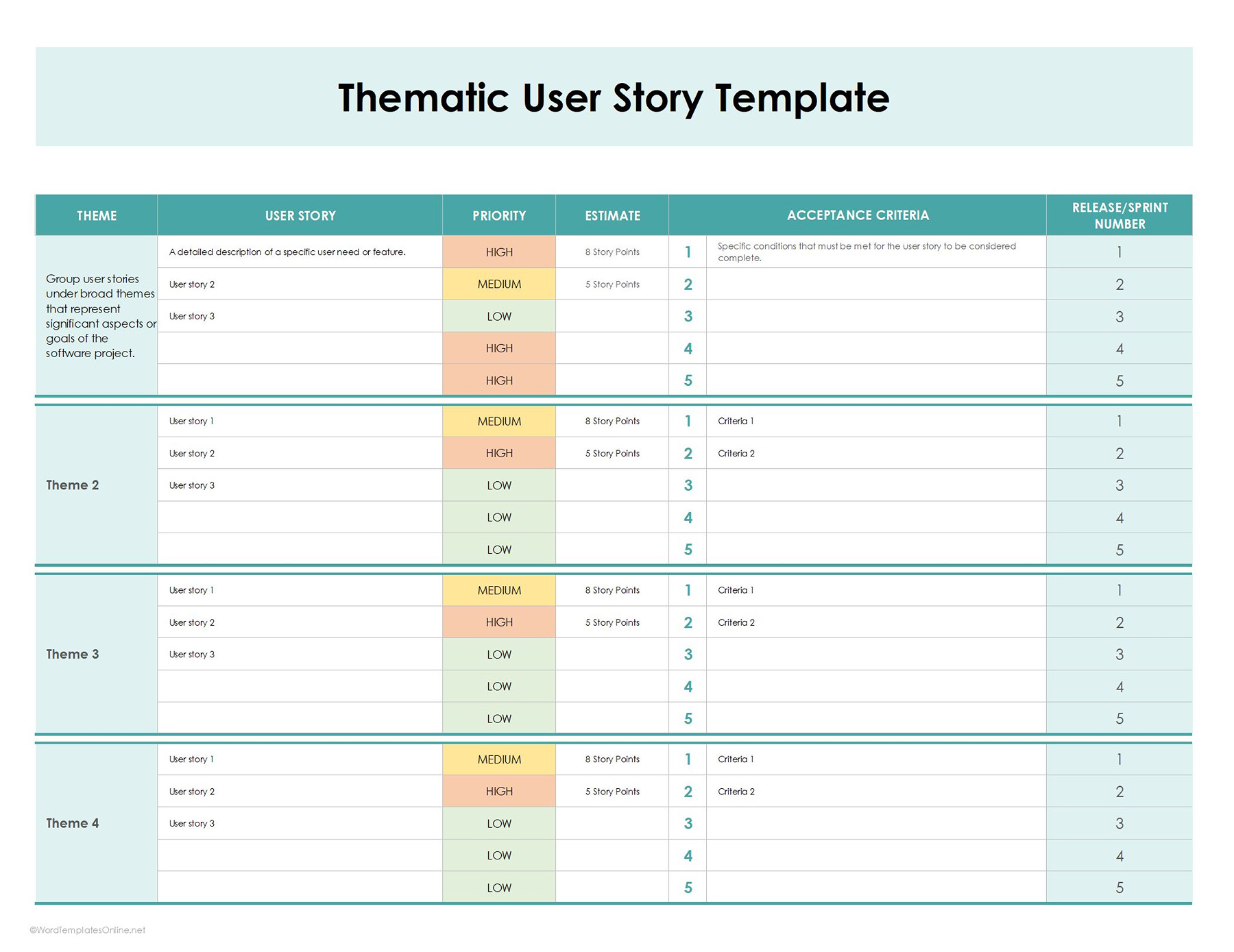
As the name suggests, this template works by organizing user stories under a broader theme or goal. It is best suited for longer projects that consist of multiple features. Usually, in such scenarios, it allows teams to organize stories, track priorities, and plan releases efficiently.
How does this template work?
So, we are clear on one thing: this template works around themes. Here’s how it maps out for a user story:
- The first column you’re seeing in the image below is of themes that highlight the high-level goal or area of the product. Let’s say it might be user account management or a shopping cart. Now you explain a category (theme), and all related stories (subthemes) fall under this.
- The second column lists user stories that represent the special features (classic “As a {user}. I want to {action} so that {benefit}”).
EXAMPLE
Story 1: As a user, I want to reset my password so that I can regain access if I forget it.
- The next step is to assign the priority (high, medium, low) based on which story needs attention first.
- Once you give the priority, add the estimate. It indicates the effort needed (story points or hours) to manage a task.
- So, when do you know a story is done? An acceptance criterion helps you do that. It is basically a mini-checklist that tells you a story is complete. Now, specify that criterion.
- In the last column, you will simply show which sprint or release the story belongs to. Through this, it is easy for teams to plan work and keep an eye on progress.
That’s all! No overcomplicating.
Template 2: Behavior-driven development (BDD) user story
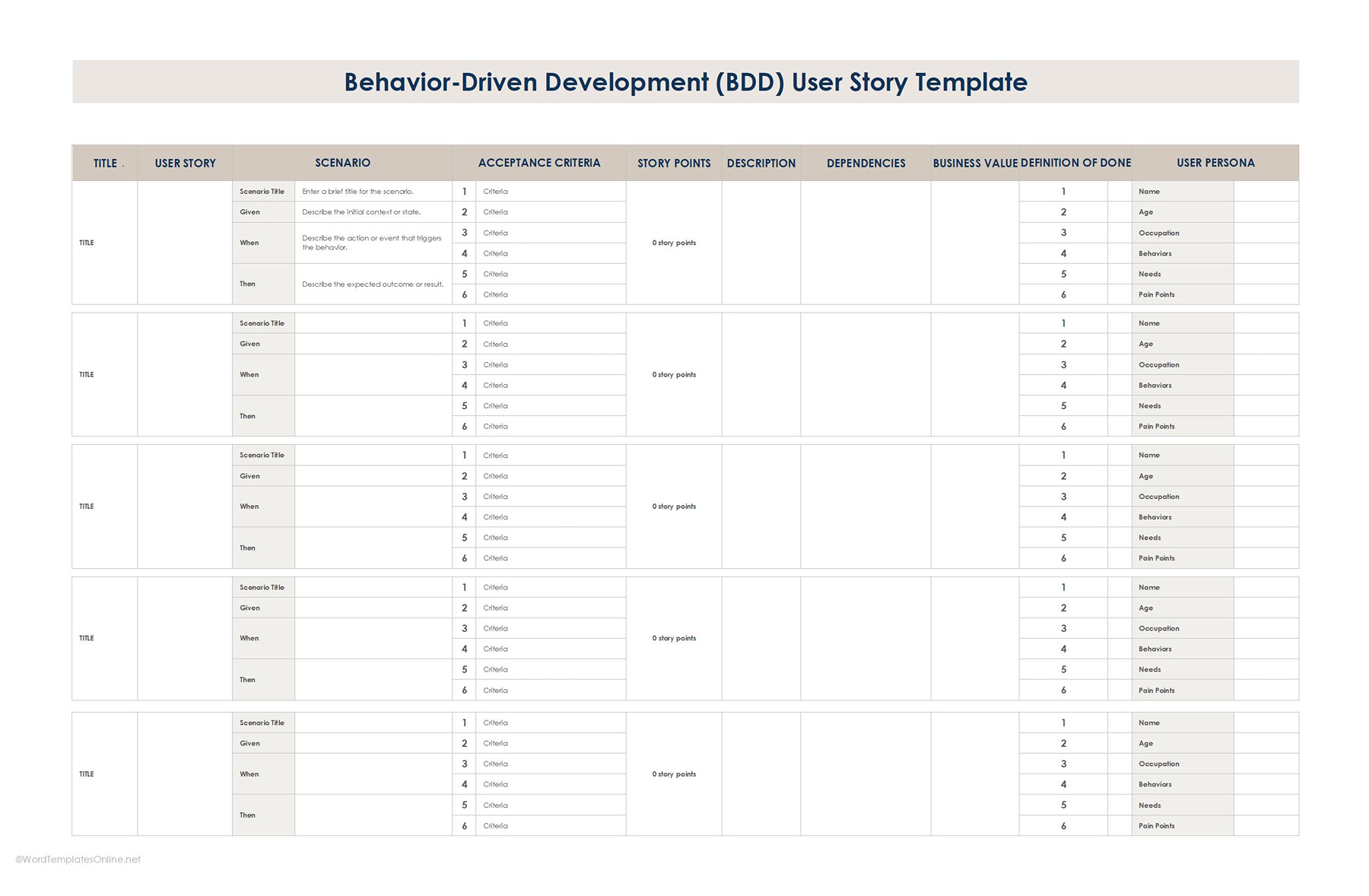
This template mixes a traditional user story and BDD approach, so besides explaining user needs, teams also focus on how the system should behave step by step. Instead of just a simple story, it uses the Given-When-Then format to describe how a feature is expected to work straightforwardly.
How It Works:
- The first column, as you can see, is the title that represents the high-level name of the user story or feature.
- In the second column, you will write the user story just like in the above template.
- In the scenario section, you will list down the concrete situations using BDD’s Given-When-Then format, such as:
Scenario Title: A short name for the scenario.
Given: The initial context or state. Example: Given I am on the login page.
When: The action or event. Example: When I Click “Forgot Password”.
Then: The expected outcome. Example: Then I receive a password reset email.
Note: It is possible to have multiple scenarios under the same story if the features have different use cases.
- After this, it’s now time to include the acceptance criteria (1,2,3..).
EXAMPLE
The criteria that show a story (Password management) is done and dusted are:
- Password reset email is sent within 2 minutes.
- User is redirected to the login page after submitting the email.
- An error message pops up if the email is not registered
- Now give story points (e.g., 1,2,3,5,8) that are the estimation of effort or complexity to carry forward a particular story.
- In case you want to write additional notes, dependencies, or technical details, you can use the description column. For example, “the login feature must be implemented before password reset.”
- In the business value section, you will add what the story is actually supposed to do. In short, it refers to results, such as increased user satisfaction or fewer support tickets for login issues.
- Lastly, mention specific information about the target user, such as name, age, occupations, needs, and pain points in the user persona. This makes it easy for the team to understand what the feature is actually made for.
Remember, our templates aren’t set in stone. You can update it as your team learns, and tweak it according to your needs. So, download them now and celebrate those “done” moments like champs.
A Simple Way to Write a Powerful User Story
Want your story to actually make sense and not leave anyone scratching their heads? Here’s how to do that:
Step 1: Figure out who the story is really for
Well, don’t jump directly into the writing. Take a pause and think, who is the main character of this story? Specify the target audience: is it a new customer, a loyal one, or an admin looking for the system?
Step 2: Define goals and what a user is expecting at the end
For clarifying expectation, you only need to answer these questions from the user perspective: What they’re trying to achieve? What’s the end goal? Maybe they want to check out quickly, or find a product in seconds. When the desired outcomes are clear, the success appears the same as you thought.
Step 3: Lay down “done rules” clearly
Sometimes we overlook the most important section, thinking we’ll see it later. Once you come out with the real problem and implementation plan, prepare a mini checklist that answers the question: How does this story actually work? Clear criteria set the right direction for developers to build the exact features.
Step 4: Add context and constraints without overcomplicating
You’ll usually find a space in the templates to cover extra context, such as technical constraints or dependencies. Make sure to utilize this as a bit of extra background, as it can save the team from a lot of confusion later.
Best Practices for Using User Story Templates: Real-User Experiences
In order to make the most out of the templates, you should incorporate the following best practices, straight from real-life experiences:
- Keep It User Centric: Always write from the user’s point of view, not just tech sides. A common Reddit tip: “Instead of ‘Build login API,’ try As a user, I want to secure login so my account stays safe. This makes it clear why we’re building and who it’s for.
- Involve Stakeholders Early and Often: Don’t write stories in a vacuum. Try to include stakeholders and people who care about the outcomes early on. In a discussion on r/business analyst, people usually agreed that if you involve product owners during the refinement phase, it helps everyone stay on the same page and avoid headaches later on.
- Make Stories Testable: Your story should be something you can check off. People are advising on Reddit: Don’t leave it vague! Rather than “Improve performance,” say “Page loads in under 2 seconds for 95% of users.” This removes ambiguity and makes testing way clearer.
- Break Down Big Stories: If your story feels huge, it probably is; you need to chop it up. Someone shared his experience on Reddit that once they split extensive monthly stories into smaller segments, it became easier for teams to manage tasks properly and ship consistently.
Conclusion
In conclusion, a user story is basically a quick way to tell the team what features they need to work on and for whom. Sound simple, right? But without a clear format and write-up, these stories can instantly turn into confusing notes. That’s where templates do the magic. They give your idea structure and make everyone understand the assignment. Once you start using them, you feel everything much more manageable.
Frequently Asked Questions
How often should templates be updated?
Generally, you should update a template whenever a new change or revision has been made by the teams. Moreover, in case you want to add more features based on feedback, you can tweak them.
Can templates fit both small and large projects?
Absolutely! Templates are Swiss Army Knives; they can scale. For small projects, keep them short, while for big projects, you can break them into different sections.
About This Article