Did you know that around 85% of people struggle with decision stress? That’s right, because most of us freeze or overthink when we need to decide between different choices. Let’s say you have two solid options on the table, both giving you a “choose me” hint. Now, the thing is, which one do you opt for? Sounds confused, right?
This is where you need a decision matrix. Instead of relying on instinct alone, it gives you a structured way to compare options side by side, evaluate them against defined criteria, and see which is the most beneficial choice.
In this guide, we’ll walk you through when to use a decision matrix, how to score and weigh each factor, and tips to effectively use this matrix. Plus, we will also introduce you to different templates available.
So, are you ready to make better decisions?
Introduction to Decision Matrix
As the name suggests, it is a comprehensive tool used to compare different options according to set criteria. This helps you make logical decisions by:
- Clearly defining the criteria that matter most
- Scoring each option consistently
- Quickly spotting the strengths and weaknesses of every choice
- Reaching a conclusion by weighing the choices
Overall, they assist you in simply reaching a final decision based on important factors and without any bias.
When to use these matrices:
You can use these matrices in almost every scenario of life where one decision has strong consequences. From choosing a college, evaluating different job offers, to prioritizing projects, they are significantly helpful in every day to day or corporate decisions.
Exploring Different Decision Matrix Templates Based on Your Needs (Free & Accessible)
Now that you know when a matrix can help, the real question is: which format should you use? Not all decisions are the same, nor are decision matrices. That’s why it is important to select formats that align with your needs.
Let’s explore different types of decision matrix templates:
1. Weighted decision matrix template
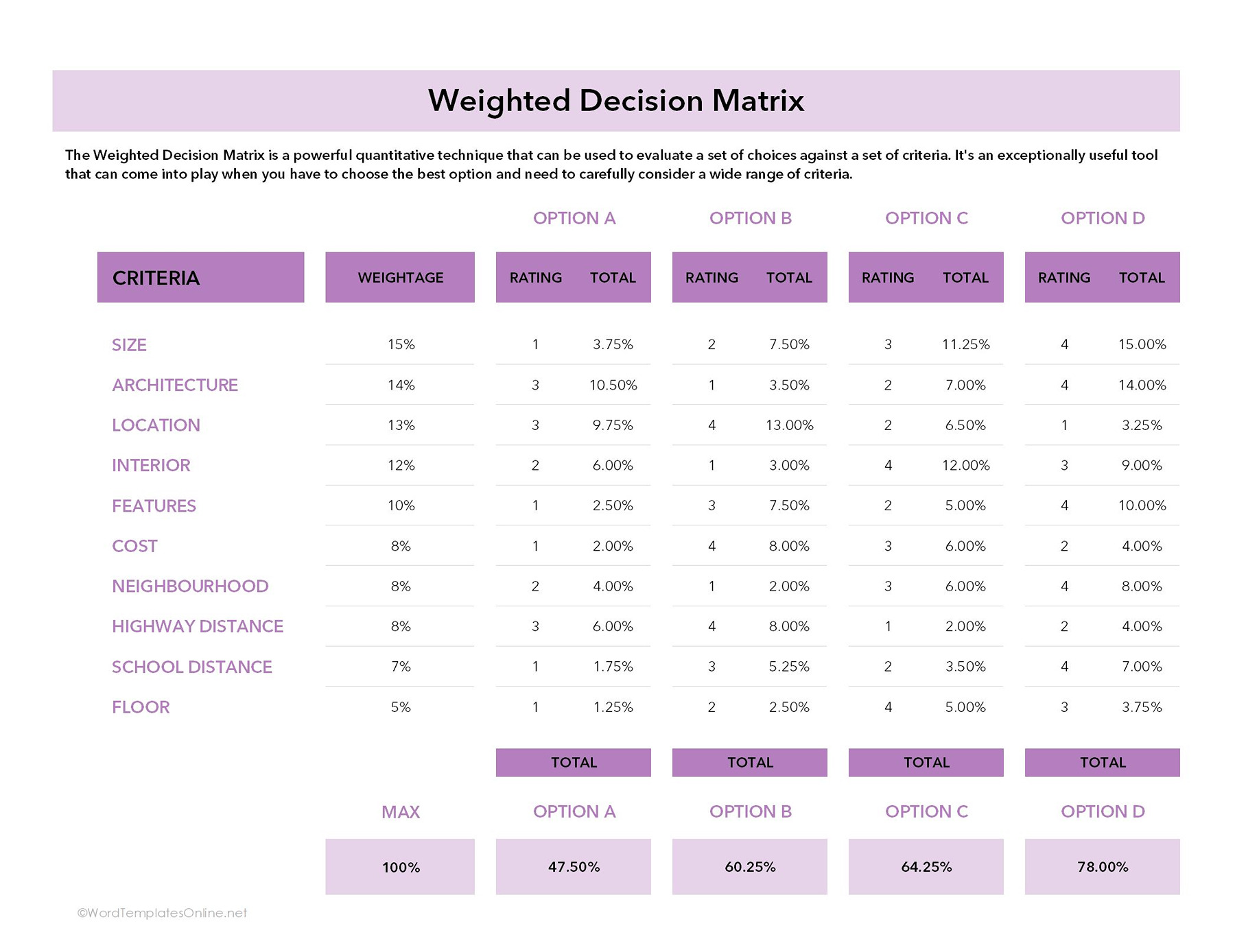
The first template on our list is a weighted decision matrix, which is designed for situations where you have multiple options in hand. As the name suggests, it helps you compare and score your different choices against several factors and come out with the one that has the highest score. Now you must be thinking how the scoring works.
Let’s understand step by step:
- In this template, first, you need to give a percentage weightage to each criterion depending on how important each is.
- While giving percentages, make sure all your weights add up to 100%.
- Next, give a score to each option (A, B, C, and D) on a scale of 1-4. The highest score indicates a better option.
- Once you assign the rating, the percentages are calculated in the total columns. You will use this formula:
Weight X Rating
Let’s calculate with the criteria 1 (Size).
So:
15% x 1 minimum rating scale (4) = 3.75%.
Each criterion will produce a score like this. These scores are then finally added at the bottom to give the final percentage for each option.
2. Build vs. buy decision-making matrix
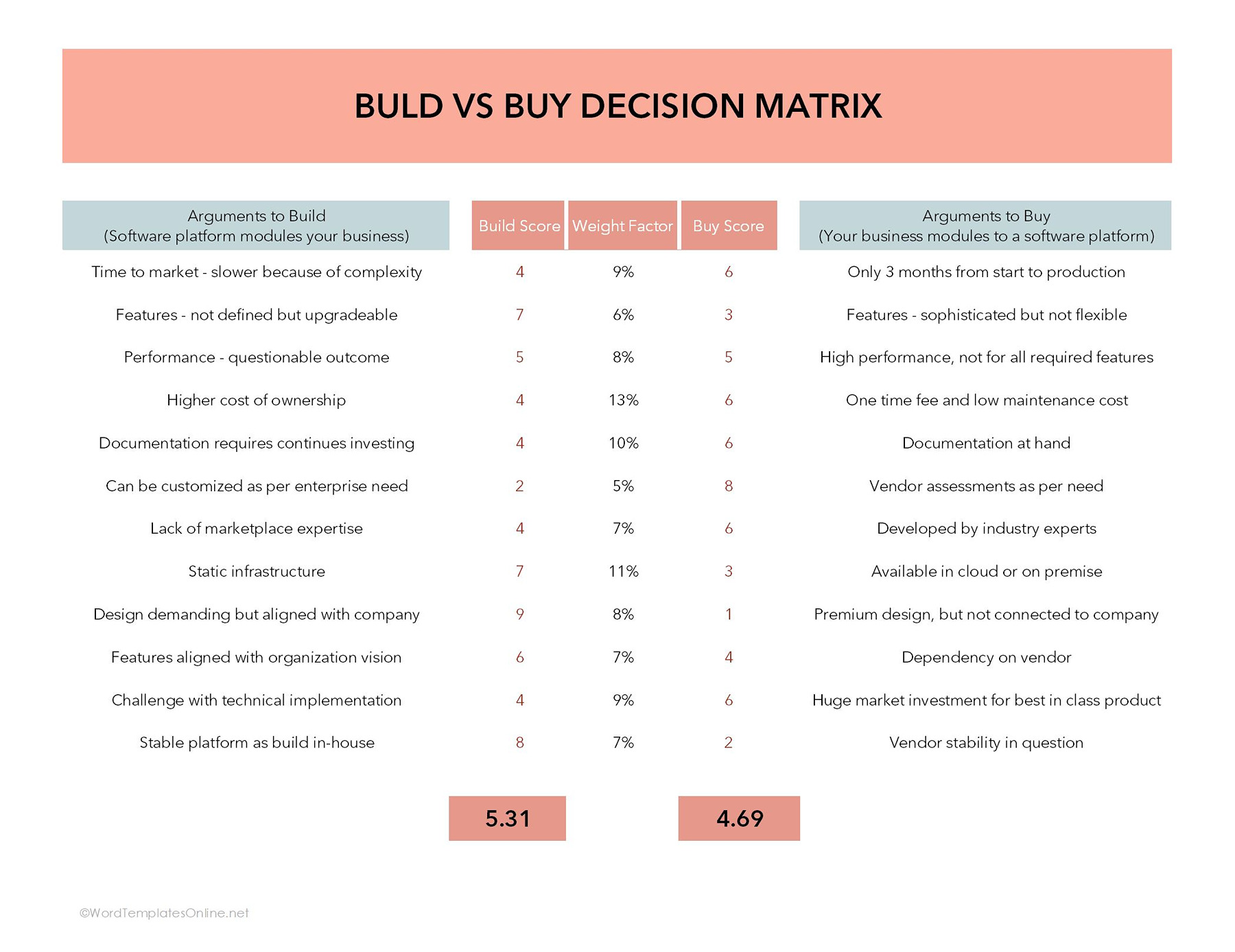
This type of decision matrix Excel template is widely used for businesses to decide whether it is more beneficial to create a product, software, or solution in-house (build) or purchase it from another vendor (buy).
The matrix works by listing the key criteria related to the decision, such as cost, time, resources, quality, etc.
How it works:
- In this template, the left column includes the arguments for building the solutions, and the right column consists of arguments for buying.
- Each factor is given a weight factor, which shows how important a criterion is in the overall decision. The total of all weight factors adds up to 100%, representing the relative importance of all criteria combined.
- Now, the best part comes where you score each option, whether build or buy, against every criterion. The scoring will be done from a scale range (1-10), with a higher number showing a better fit for that specific criterion.
- The weighted score for each criterion is calculated using the formula.
Weighted score = score x weight factor (in decimal form)
For instance, if the “time to market” criterion has a weight of 9% (or 0.09) and the build option scores 4, the weighted score for build would be 4 x 0.09 = 0.3. The same calculation is carried out for the buy option using its respective score.
After you get the weighted score for all criteria, you will calculate the total score for each option by summing these individual scores. The highest one gets your priority.
3. College decision matrix template
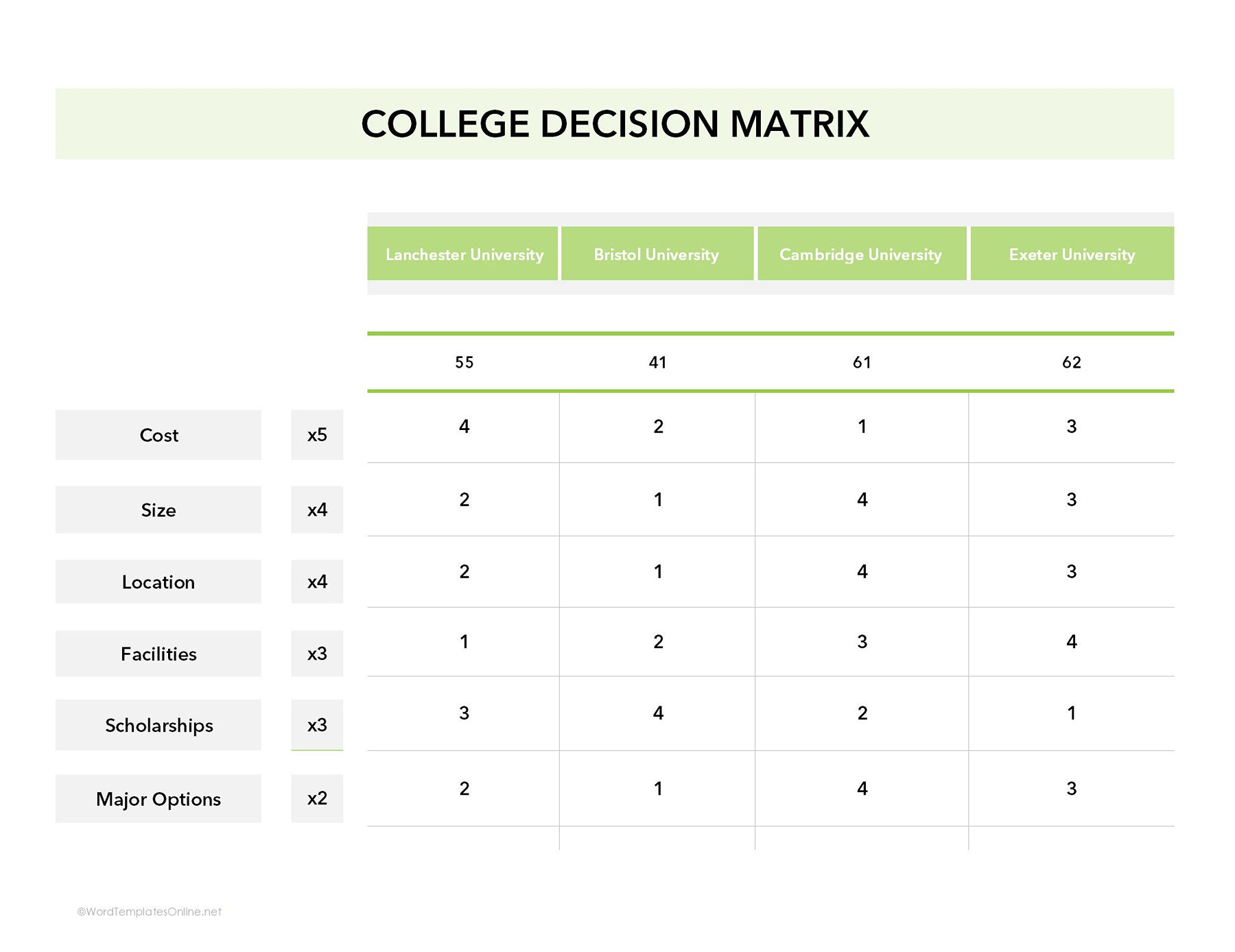
We all have been in a situation where choosing a college feels like an uphill battle. With a lot of factors to consider, making a confident choice is difficult. Here, a college decision matrix can act as your saviour, letting you line up all your options side by side and compare them using the same set of criteria.
How to use this template:
- The decision matrix template, as you have seen, has a simple grid structure. Start by adding the criteria you’re measuring in the vertical column and then your choices in the above horizontal row.
- After this, you will score each factor on a consistent scale (for example, 1 to 4).
- Once you assign the score, multiply each factor score by its designated weight (such as x3, x4, x5, etc).
- The weight showcases the importance of that factor in your decision-making process. For instance, if cost is rated 4 and has a weight of x5, the weight score becomes 4 x 5=20.
- Finally, all weighted scores for each college are added together to calculate a total score.
4. Ethical decision matrix template
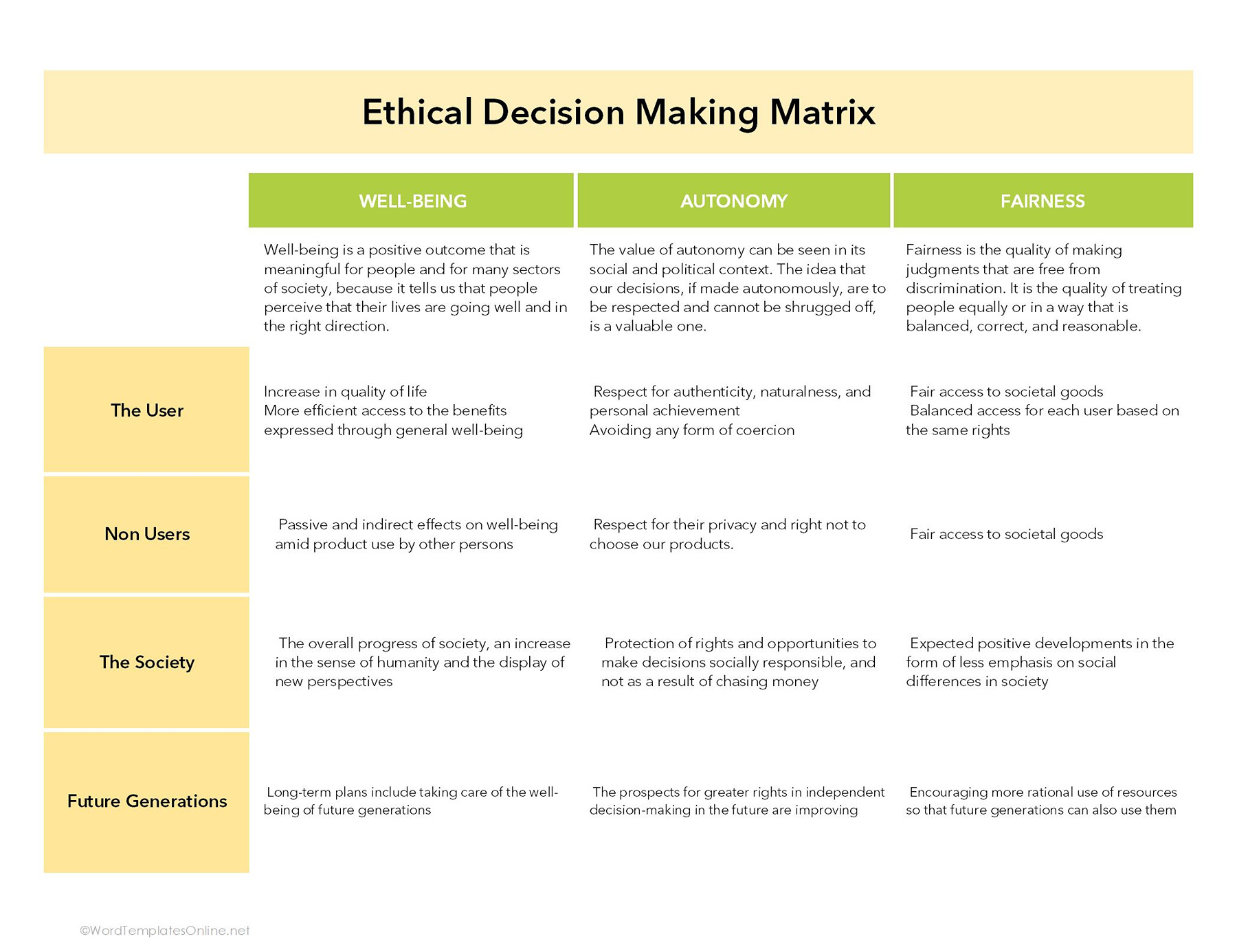
This template is used to assess complex ethical dilemmas where a decision spans moral uncertainty, competing values, or potential harm. It is perfectly fit for the situations where there is no clear “right” answer and where multiple stakeholders are involved.
How it works:
By evaluating qualitative criteria such as fairness, harm, responsibility, and impact (depending on your needs), the matrix advocates reasoned, consistent, and defensible ethical decisions, free from personal bias or emotions.
5. Design decision matrix
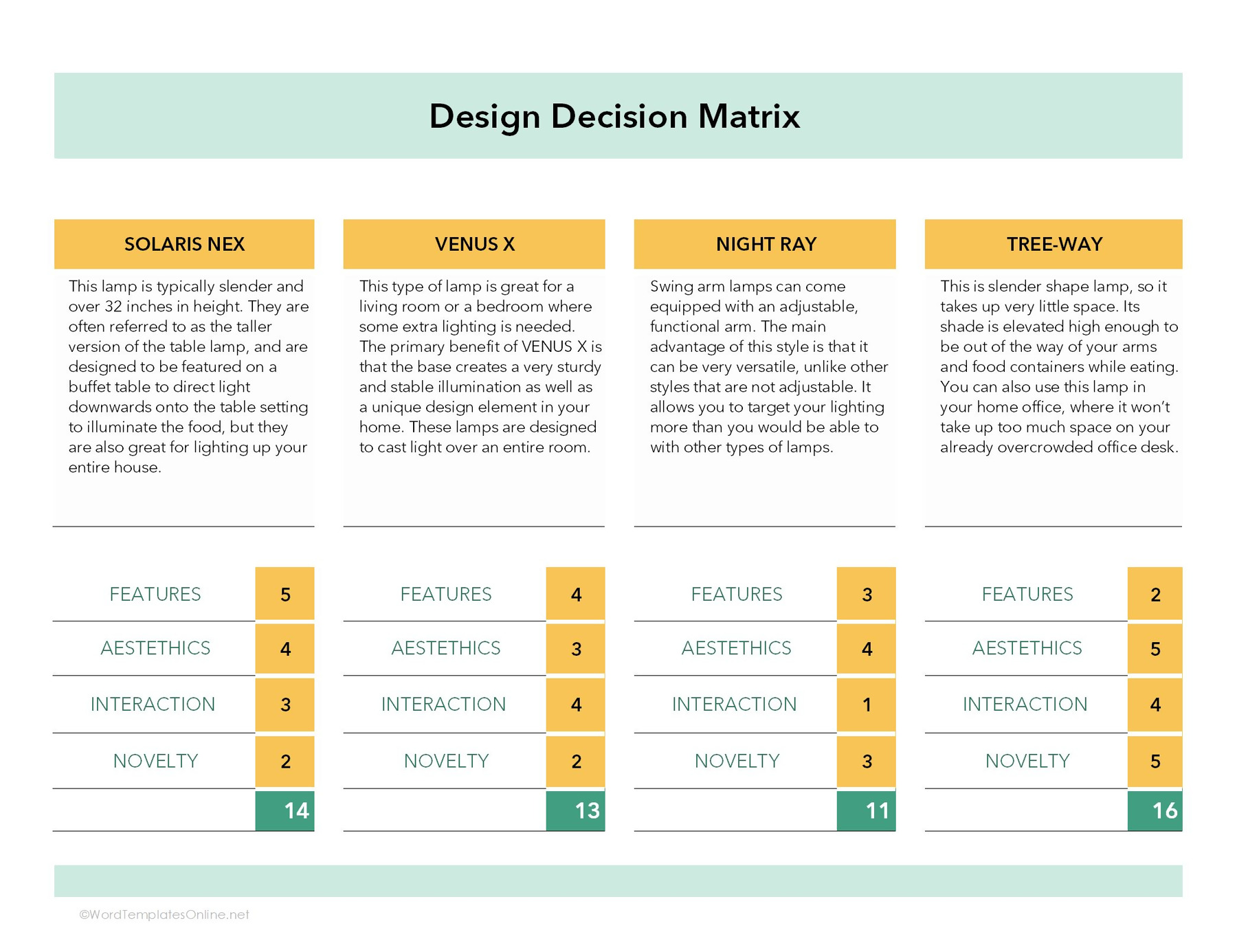
If you’re a creative professional and want to determine which design should go in a particular scenario, then this template helps you do that. It is used to compare multiple design options in a structured and objective way.
How to use & score this matrix:
- Once you download this template, write your options and a description in the above section.
- After this, set different parameters through which you analyze each design alternative. For instance, we have measured options against features, aesthetics, interactions, and novelty.
- Now the main part comes, where you score each factor using a numerical scale from 1 to 5. For instance, we feel features are the most important factor; therefore, we give them 5, and so on.
- After scoring, all the values for each design are added together to calculate a total score. The design with the highest score is considered the most suitable choice.
6. Job Offer Decision Matrix
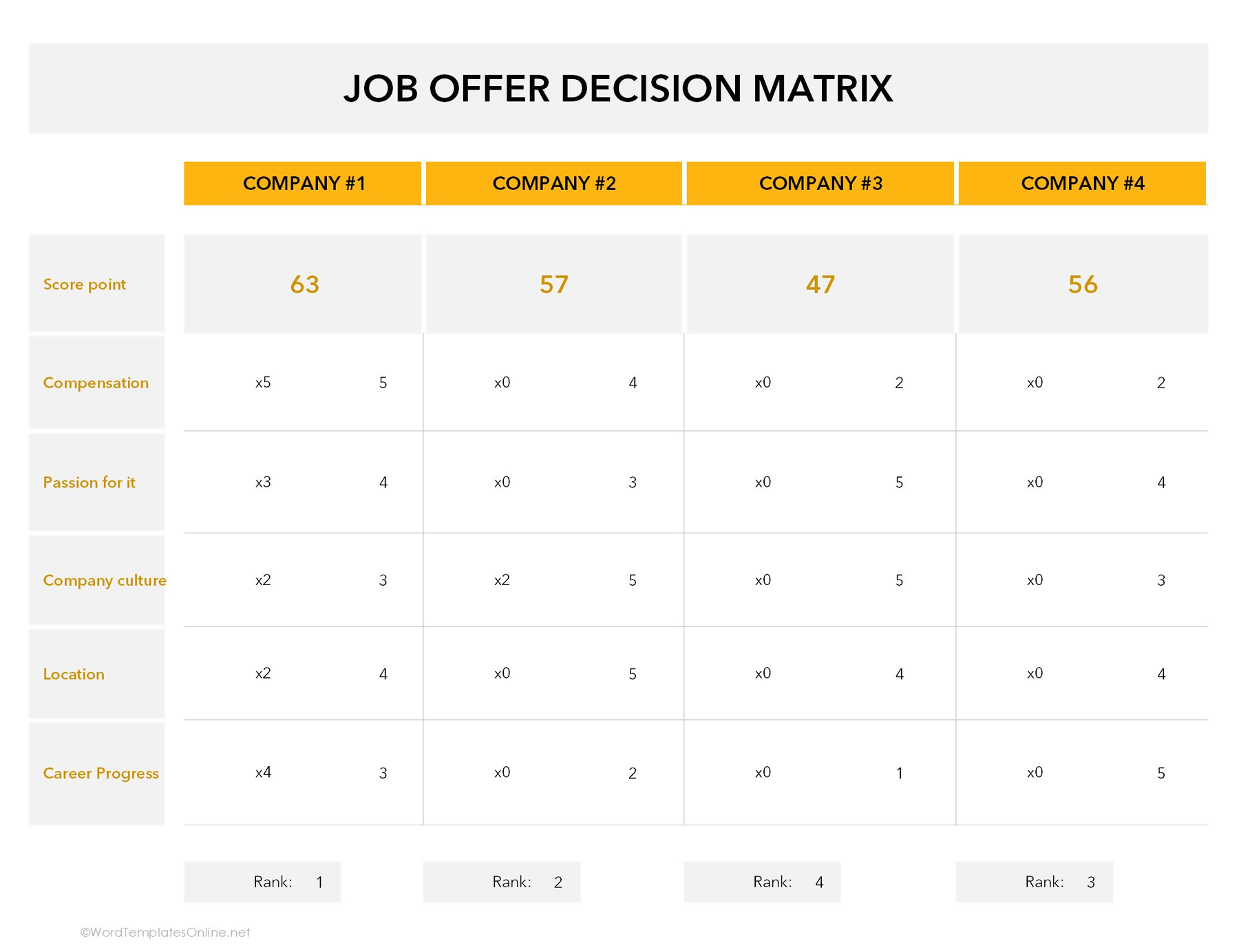
This template is used when you have multiple job offers, and you do not know which one to accept. This is an important life decision; you cannot rely on impressions only. Using this template helps you make informed and confident career decisions.
Let’s find out how this template and scoring work:
- First, as we did in all templates, define the criteria and write your options.
- After this, rate each company against the selected criteria using a scale ranging from 1 to 5. For example, if company 1 offers a very strong salary package, it may receive 5 under “Compensation.”
- After this, each criterion is given a weight (such as x2, x3, x5, etc), which describes how important that factor is to you. Suppose if compensation is very important, it may be weighted x5. The score is then multiplied by this weight to calculate the weighted score.
Consider,
compensation = 5, and the weight is x5
5 x 5 = 25 (weighted score).
- By following the above formula, come up with scores for other criteria as well.
- Now, add all the weighted scores for each company to get a total. The one with the highest score will rank first and be considered the best option.
7. Project Decision Matrix
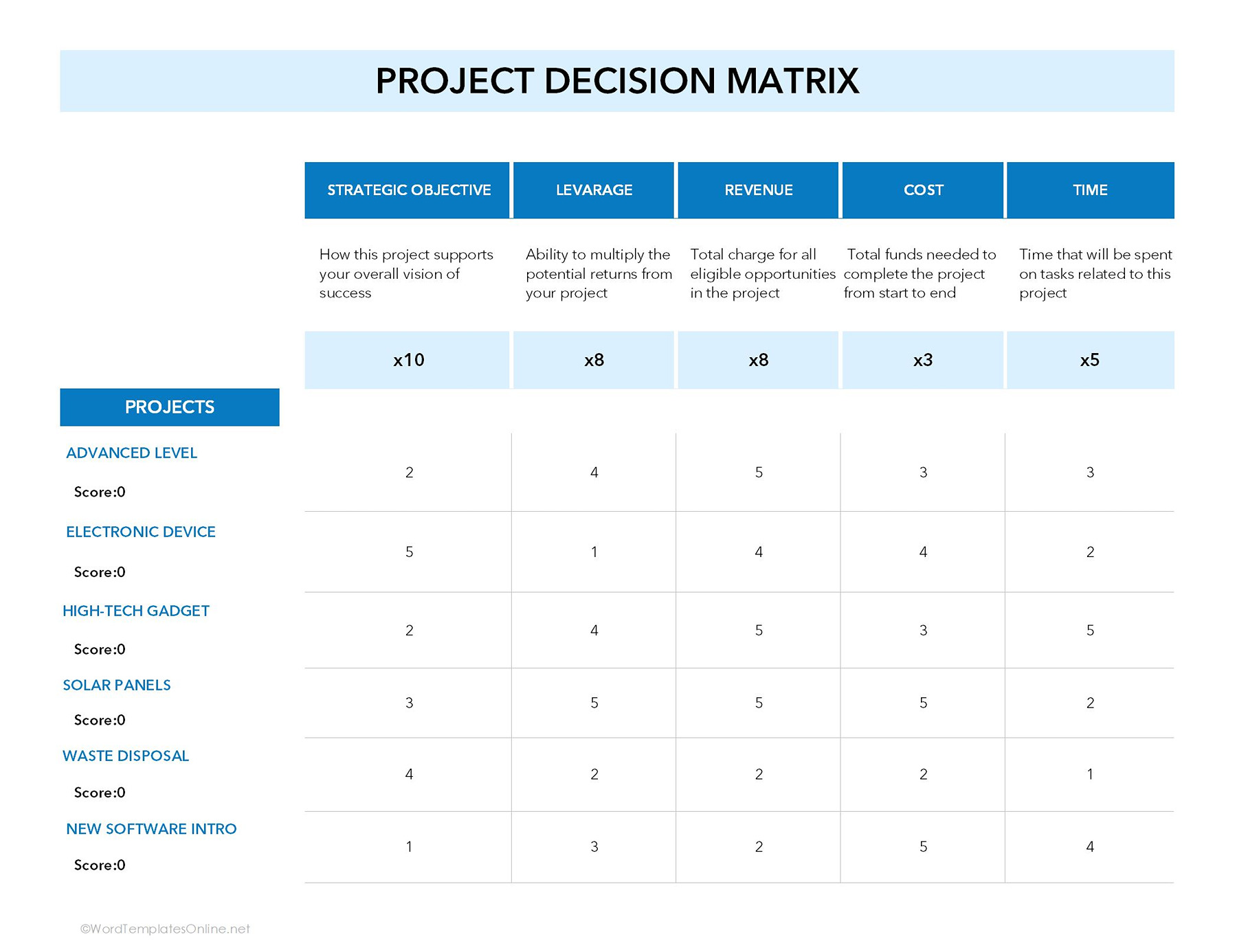
True to its name, this template is all about assisting organizations in figuring out which projects deserve the spotlight. To find this, you compare different projects against key factors such as goals, revenue, cost, and timeline. Moreover, this also helps you quickly see where to put resources, budgets, and drive the biggest impact.
Let’s understand how the scoring works:
- Get this template first, and then list the criteria and initiatives.
- Now, give a weight to each criterion (x10, x8, x5, and so on), which overall reflects its value to the organization.
- To get the total, in this step, you need to multiply each project score by the weight of that criterion. (e.g., strategic objective (10 x 2 = 20).
- After this, add all the weighted scores together. Ultimately, the project with the highest total weights score becomes the top priority.
8. Job Change Decision Matrix
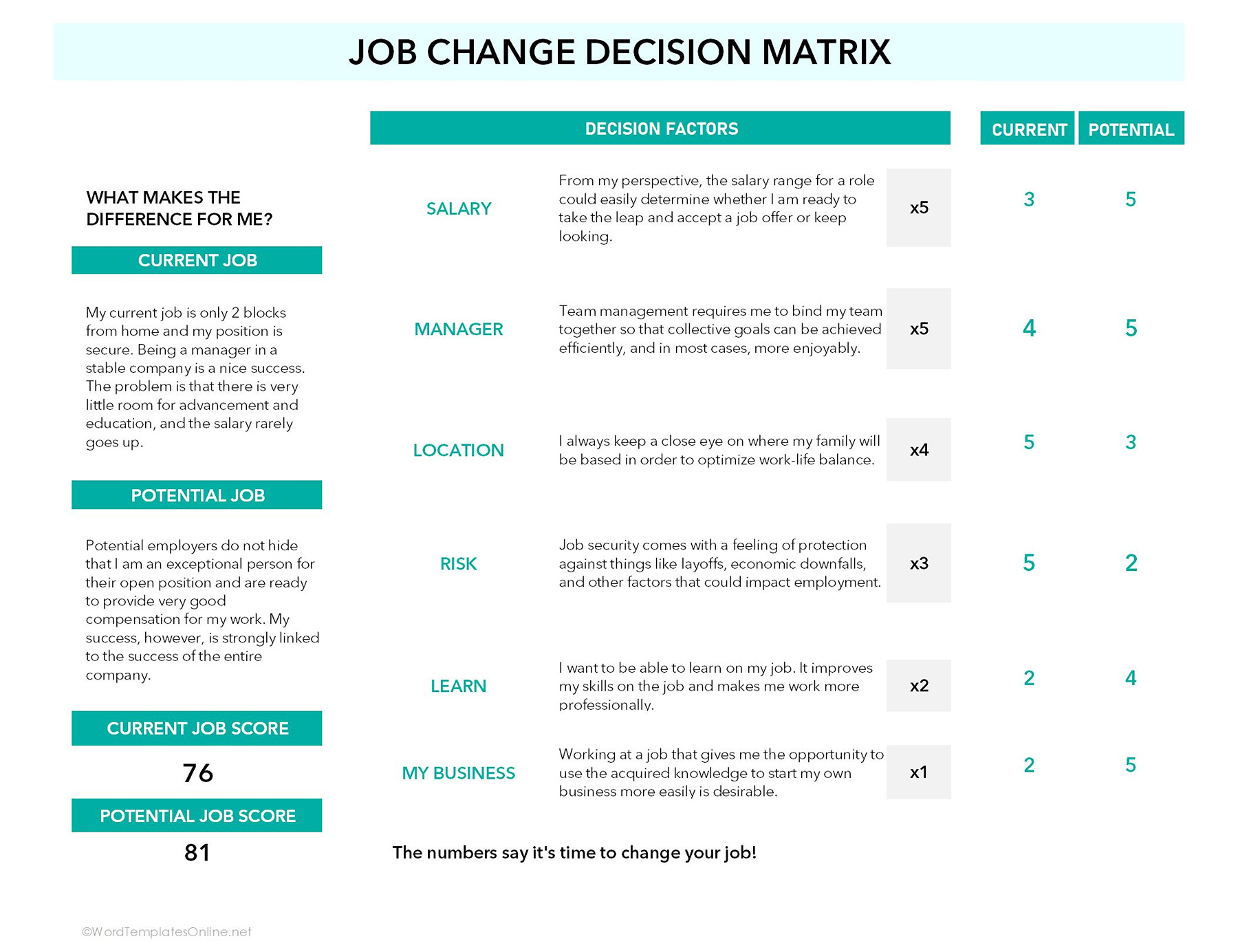
If you ever feel confused about whether to stay in the current role or jump into the new opportunity, this template is your decision-making sidekick. Instead of doing boring comparisons, it helps you look at the bigger picture and choose the path that truly feels right.
How to use this template:
- Using this matrix is really easy. Once you download it, edit the criteria and options (potential vs current job) with your preferred choices or keep it as it is.
- Carefully look at the criteria and then give weight (e.g., x5 or x4) based on importance. After this, score both the current and potential job against factors on a scale, ranging from 1 to 5.
- Now multiply each score by its assigned weight (e.g., Salary for current role 3 x 5 = 15).
- After this, the results for each factor are added together separately for the current and the potential jobs.
- The final totals give you a clear direction of which option better aligns with your priorities.
What Elements Make a Comprehensive Decision Matrix Template
You might be thinking: What makes a decision matrix template reliable? And can you trust every template you come across? The questions are natural, particularly when your choice depends on it.
So, here we come up with key features that make a template accurate and clear.
1. It has clear criteria and a scoring system
- First off, a solid template starts with clear, well-defined criteria that actually matter for the decisions at hand.
- On top of that, it uses a simple scoring system, such as a numerical scale, so that you can analyze each option fairly and reasonably.
2. It must have an organized layout for options and weights
- Yes! A good template offers everything in an organized manner, usually in a table or grid layout.
- Moreover, it has clear sections for writing criteria, options, and scores through which you can review your choices at a glance.
3. It includes space for notes and assumptions
- Apart from the above features, a right template has a separate descriptive section that allows you to record important details, assumptions, or explanations behind each score.
- Through this, you can maintain transparency and review decisions side by side.
4: It has an easy-to-read format
- The real magic of an appropriate template is how clear it is.
- A good one has a comprehensible and editable layout that makes adding or removing any row or column a breeze.
How to Edit a Decision Matrix Using a Template
Editing and using a decision matrix is easier than you think. With the right template, you can instantly plug in your options, define criteria, and assign weights, all in a clear format.
Here’s how you can do it:
Step 1: Get crystal clear on your decision
Before anything else, nail down exactly what decision you’re making. The more straightforward your question, the easier it is to assess options. Take it as your final destination before initiating a journey.
Step 2: Dump all your options on the table
In the next step, write down all the possible options; don’t overthink it. The more complete your list, the more accurate your decision matrix will be. Think of this as gathering all your travel routes before choosing the best one.
Step 3: Pick your decision compass (criteria)
Take a pause, and think, what really matters for this decision? Is it cost, quality, time, or something else entirely? These criteria act as your guiding compass, helping you find the options and steer straight toward the best choice.
Step 4: Weight your priorities
Not all criteria are created equally. Once you list down all the criteria, give a weight to each one based on how important it is. This will make sure that your matrix showcases your priorities, not anything fluff.
Step 5: Score each option like a pro
Now, it’s time to score your options! Rate each one against the criteria. It is recommended to give a score realistically, so that you eventually get comparable numbers and can read at a glance.
Step 6: Let the number speak
Multiply, sum, and voila. This is where clarity wins – your smartest and most confident decision is right in front of you.
Be Careful with These Mistakes!
Here are some common mistakes you should not overlook when you’re playing with a matrix:
- Adding too many factors can instantly turn your matrix into a messy, hard-to-manage spreadsheet. The worst part? It dilutes the criteria that really matter.
So, always keep it simple and focus on factors that truly matter.
- Another common loophole? Sloping weighing. If your scores don’t show true priorities, your results can be misleading. That’s why you should always give weights thoughtfully.
- Packing your matrix with unnecessary calculations, too many scoring layers, or extra steps can quickly turn a helpful tool into a confusing one.
To keep it practical and effective, stick to a clean template that keeps the process simple and easy to follow.
Wrapping Up
Why leave your decisions to chance? A decision matrix gives you clarity and structure to line up your options, weigh the important factors, and finally say goodbye to indecision.
In addition to this, the right template and approach can make even complex decisions easier to evaluate and justify. When your choices are guarded by proper criteria instead of assumptions, confident and well-informed decisions naturally flow.
Frequently Asked Questions
Can I reuse the template for multiple decisions?
Of course, why not! A good template is always reusable. You can just use options, criteria, and weights for any decisions without starting from scratch.
What scale should I use for scoring?
Preferably, it is better to use a numerical scale (1-4, or 1-5). Additionally, most templates use this scoring pattern.
Are your decision matrix templates customizable?
Absolutely! Our templates are fully customizable, which means you can adjust criteria, options, and scoring according to your needs.
About This Article