When projects become bottlenecked, one question that circulates in the room is “Where did things go wrong?”
And no one has a clear answer. The marketing team says they handed off the lead, sales say they never saw it, and the client is left waiting in the middle. Suddenly, your daily operations feel sucked and more like a black box. Well, this is more common than you think, and it’s exactly why process mapping matters.
A good template helps you visually break down how work actually flows, step-by-step and role by role. Through this, you don’t rely on assumptions only, but give your team a clear pathway to understand, follow, and improve the process. Whether you’re handling operations, onboarding employees, or fixing issues, the right template sets everything straight. Let’s find out how:
How Process Map Templates Actually Help (When Used Right)
A template makes a noticeable difference in how work is done if it is used correctly. With this, everyone will stop asking “what’s next?” or “who’s responsible for this?” as everything is clearly laid out, which removes confusion and brings clarity to the workflow.
Not only this, but it also makes onboarding and other business operations smoother because new team members don’t have to guess their way through tasks; they can actually see how things flow.
On top of that, it brings a sense of accountability as everyone knows what exactly their job is, and no finger-pointing. And most importantly, it helps you find inefficiencies that usually go unnoticed, making it easier to fix gaps and improve the overall process.
8 Different Types of Process Map Templates Designed According to Specific Workflows
Not all processes work the same way, which is why different types of process maps exist. Each one is useful in specific situations, so that you can map your workflow clearly:
1. Business process map template
This template is particularly helpful when you need to show how a business process flows in a stepwise manner. Think of it as a visual guide that revolves around three basic questions: what needs to be done, who is doing it, and what’s happening next. Here’s how you can use this template:
As you can see, first you need to lay down an “idea”, which gives you a foundation to kick off your business. From there, you will move the process to other stages like the Study Case, Target, and Implementation. These steps are basically related to planning and execution, for instance, first you analyze the situation, then define what you want to achieve, and finally put things into action.
Below that, you’ll notice a few terms like Trend, Review, Action, and Result. Now, what do these steps reflect in a process? These show that a process is not a straight line; it goes through complete detailing, monitoring, and improving. You review trends, review performance, take action, and then measure the results. Apparently, all these steps lead to the final call, which is the “Result” of the entire process.
Business Process Map Template
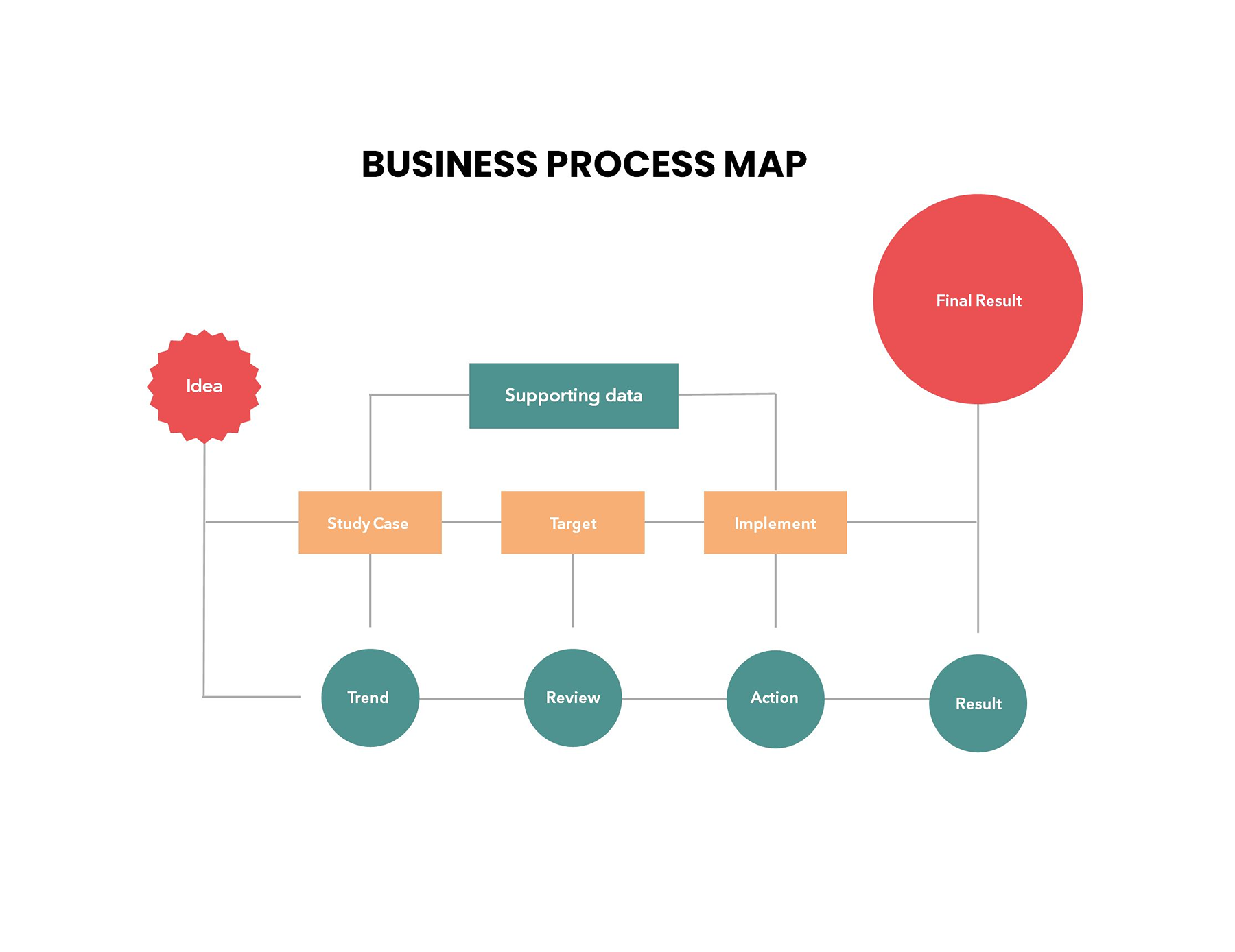
Business Process Map Template
2. Healthcare process map template
As the name suggests, this layout maps the journey of a medication within a healthcare setting or a hospital setting. For instance, as you can see, it starts right at the source with a doctor writing a prescription, which is then handed over to the pharmacy.
After that, the handoff is seamless: an attendant gets the medication and gives it to the ward, where the nursing team takes the lead. The nurses then prepare and administer the medication and document the complete activity. Each step is transparently laid out so everyone knows their role and what comes next.
Overall, the template puts everything in order so that the patient care processes are more reliable and error-free.
Healthcare Process Map Template
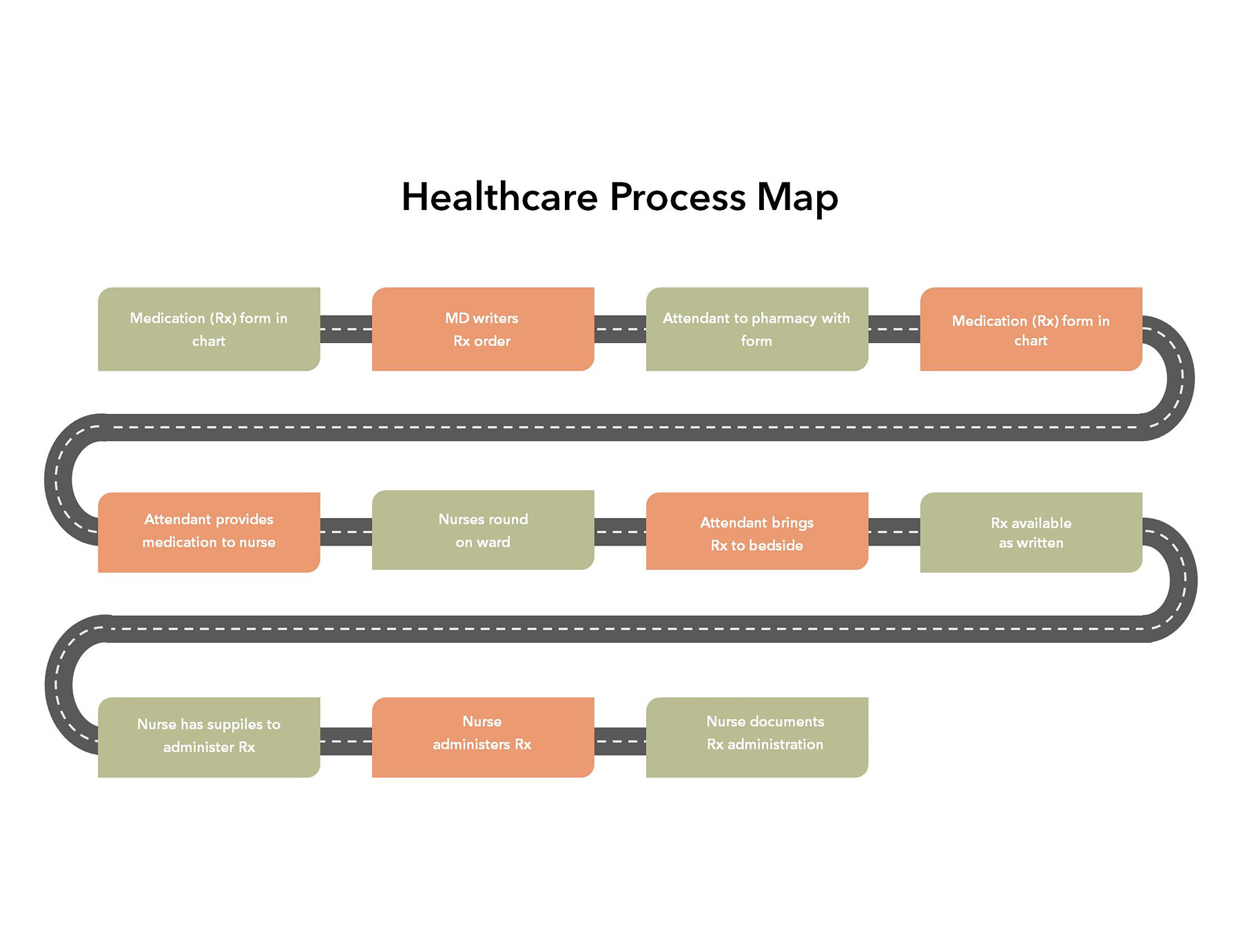
Healthcare Process Map Template
3. Onboarding process map template
This format shows you how a new employee moves from accepting a job offer to becoming fully productive in their work environment. The template makes sure you never miss a beat during the important transition from “yes” to “on boarded.” It initiates the moment an offer is accepted and moves straight into the signing stage, where all the formalities and paperwork are checked off.
From here, the employee goes through orientation, where they receive a company introduction, its culture, and basic expectations. The process is then carried forward to training, which is generally the longest phase, where the employee learns the skills and tools to stay updated with their role.
In short, this is a timeline-style layout that covers one big truth: onboarding isn’t a single-day process; it is a multi-week journey. Each stage serves as a vital building block for the next, ensuring the new hire doesn’t show up but eventually settles in.
Onboarding Process Map Template
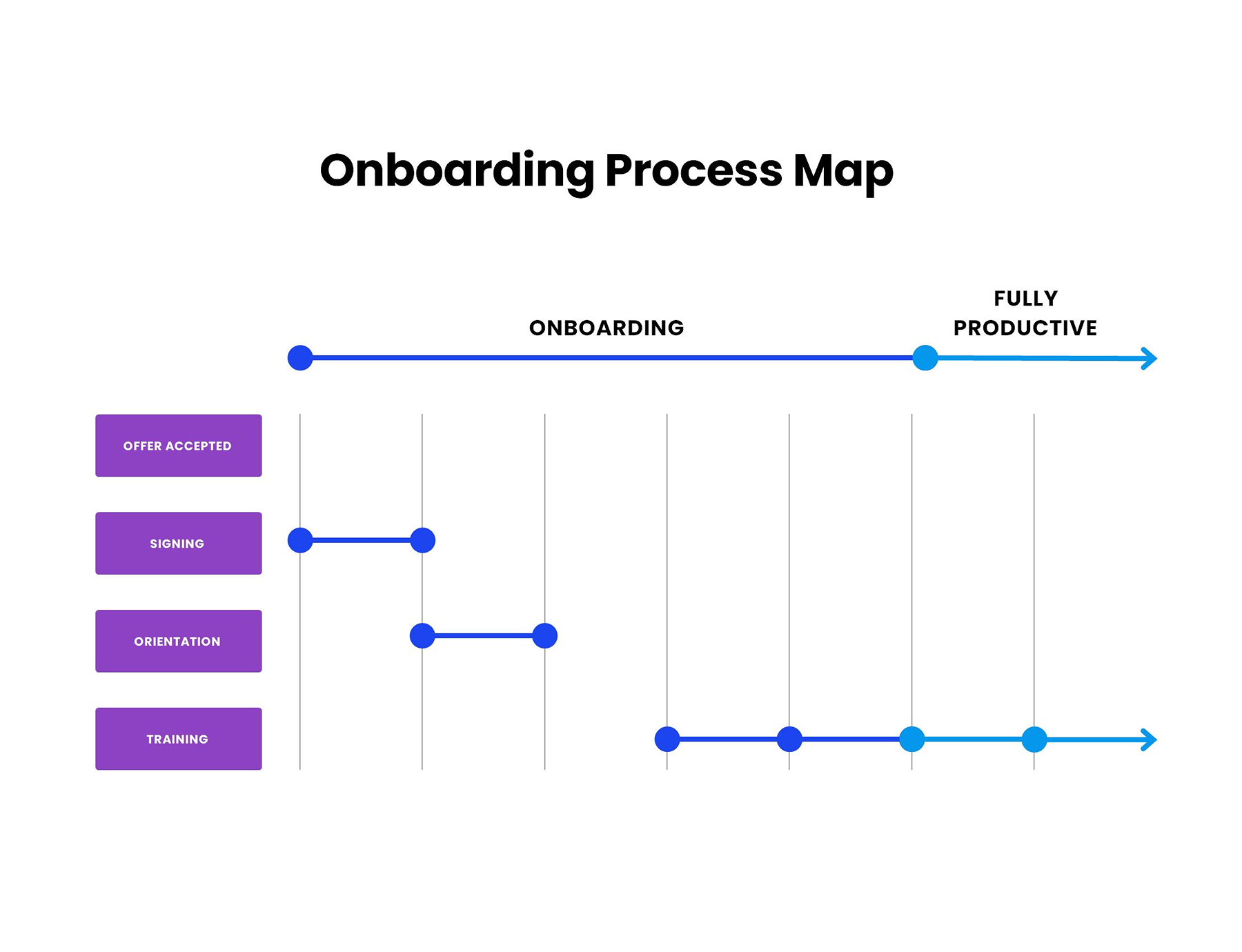
Onboarding Process Map Template
4. Recruitment process map template
Hiring is a high-stakes puzzle where a single oversight can lead to a costly “bad hire”. That’s why this template acts as your roadmap, keeping a strong eye on the candidate journey from the initial application to the “final yes”. It kicks off the moment a lead is generated, whether through LinkedIn, job boards, referrals, or internal moves through the Application Tracking System.
Once applications roll in, the process goes into a filtering stage where resumes are reviewed against core requirements. In case they don’t, a rejection email is sent, and if they do, they move forward to the next step, i.e., phone screening.
After the initial screening, candidates are evaluated through different ways, such as face-to-face interviews, discussions with the hiring manager, or assessments. At every step, decision points like “meet criteria” or “recommended” are given to check whether the applicant progresses or is rejected.
By following this process, talent acquisition teams can easily manage the recruitment drive and make sure fair decisions take place.
Recruitment Process Map Template
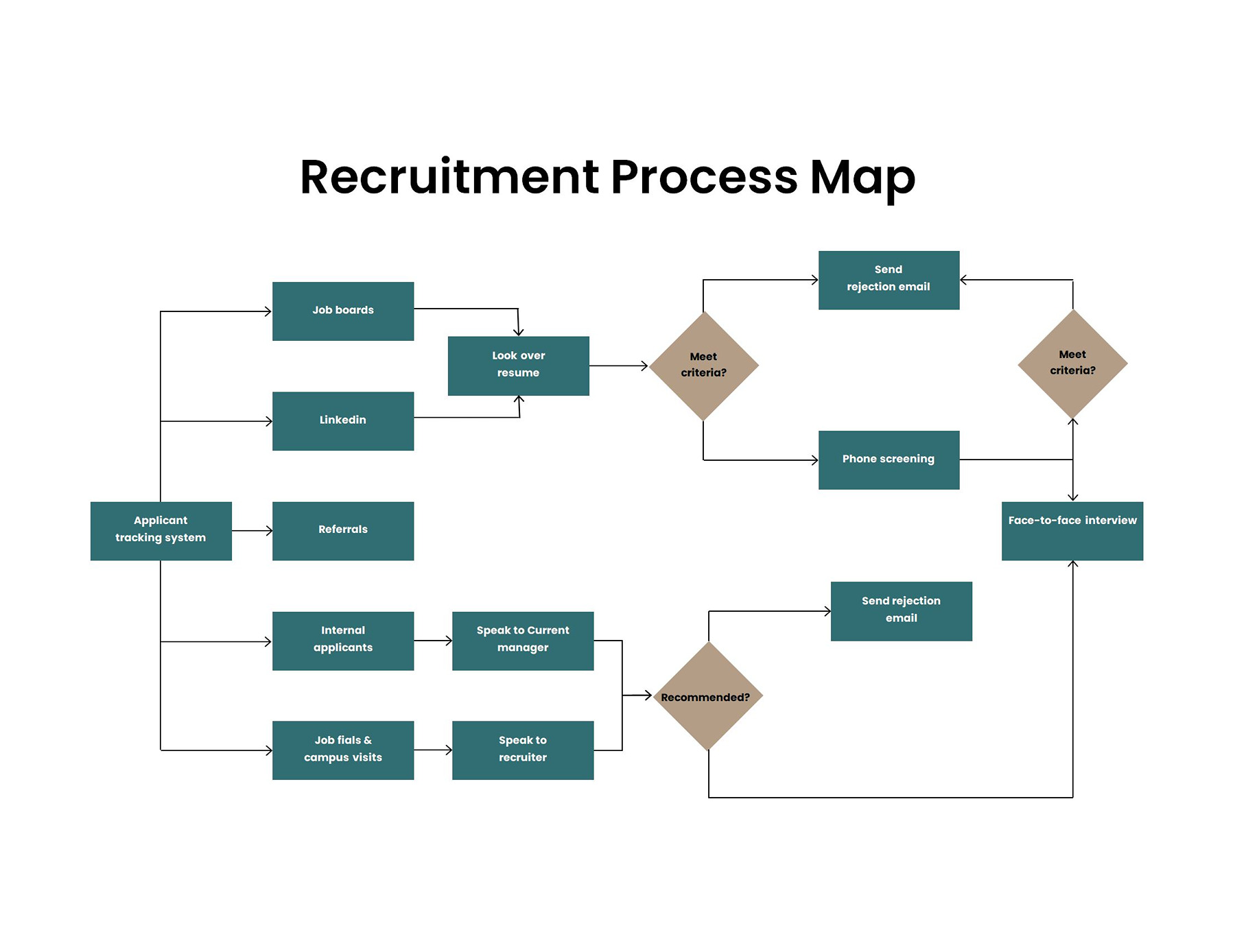
Recruitment Process Map Template
5. Six sigma process map template
The layout follows the classic DMAIC framework (Define, Measure, Analyze, Improve, and Control) through which you can optimize any business workflow and discard waste. Here’s how to use this template:
- In the define section, you need to figure out the “pain point.” You gather your team to listen to what the customers actually want and explain what you’re trying to fix.
- The next step (measure) is where you get real with numbers. Here, you look at how things are running right now to get a baseline. Moreover, this also involves tracking how often things go sideways so you have a benchmark to beat.
- Now move on to the analysis part, where you dig into the “why”. By analyzing the data, you find out the root cause of inefficiencies and variations, allowing you to find out exactly what is preventing the process from running smoothly.
- The next step is “ improve,” which is usually the “fix-it” stage. You think and plan ideas, run some experiments, and find the best way to smooth out the bumps.
- Finally, now comes the “control” stage, where you make sure that the changes you’ve made are actually working. You look at the operations and systems to check that the team doesn’t slip back into their old, messy habits.
Six-Sigma Process Map Template
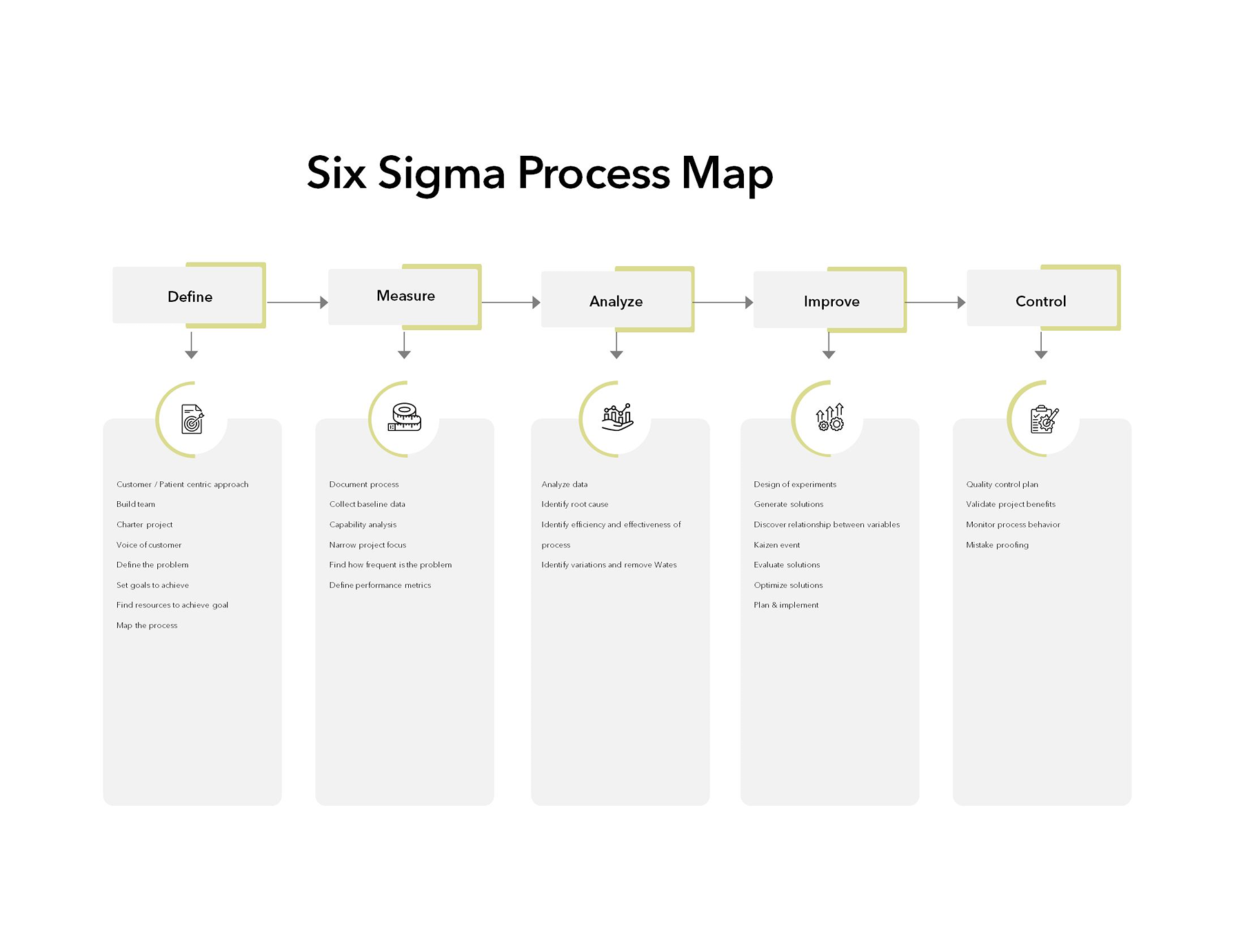
Six-Sigma Process Map Template
6. Software process map template
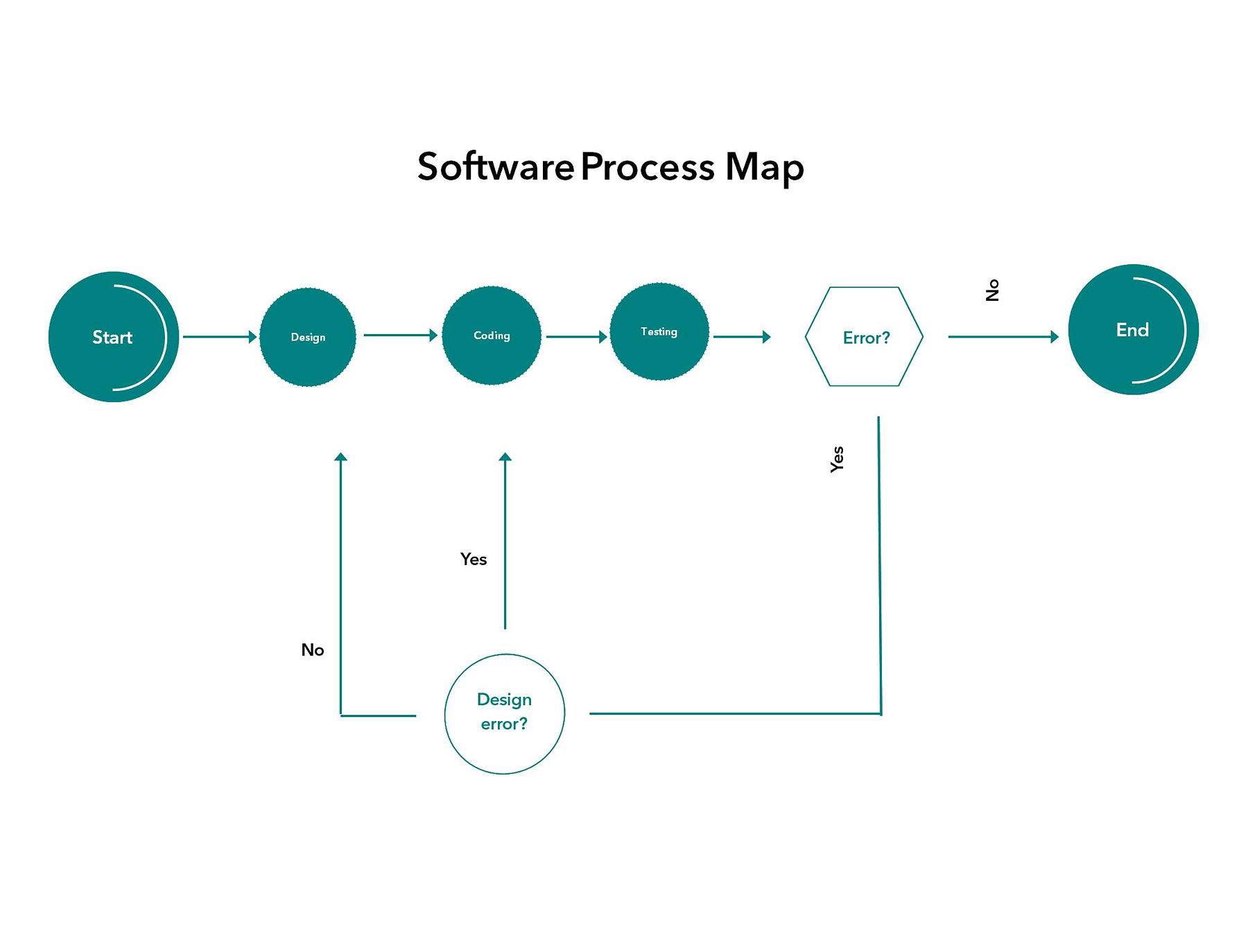
Making software from scratch is not an easy game. This map format shows that standard software development goes through a series of steps. Here’s a simple breakdown of how it works:
The process follows a linear path from Start to End and mainly goes through four steps:
- The first one is the design phase, where you plan the architecture and user interface and come up with unique ideas.
- Next is the most hectic part, where you code everything and build the features.
- Once you write the script, here comes a testing phase to see if what you built is actually working.
- Now comes the most significant part of software development, which is called “error check”. Here, you find the answer to one question: “Is there any error in the whole process? If the answer is No, the project is done and dusted.
- You may have seen a feedback loop, which is the possible scenario in case an error is found during testing.
- If it’s a coding error, the path loops back to the Coding stage to fix the bugs.
- If it’s a design error, like something in the plan was flawed, the path loops all the way back to the design stage to make it correct before recording begins.
Software Process Map Template
7. Swiss lane process map template
This is one of the specialized flowchart-type maps that is designed to show who is responsible for what at what step of the process. It divides the chart into “lanes” that clarify the handoffs between different departments or roles.
For instance, the template shows an expense reimbursement process. On the left side, you will see the lanes showing different players, such as the Salesperson (the one initiating the request), Sales Manager (the first level of approval), Payroll Clerk (the one handling the money transfer), and Financial Manager (the final approval). Talking about how the process flows? It usually goes horizontally and vertically across the lanes. Let’s say the first part is the initiation, where the Salesperson kicks off things by submitting an expense claim for a business dinner. After this, it moves to the Sales Manager for review and approval. If it is approved, it will go down to the Payroll Clerk to authorize the deposit into the account. Finally, the Financial Manager receives a notification of the payment, and the Salesperson is notified that their money is on the way.
Swim Lane Process Map Template
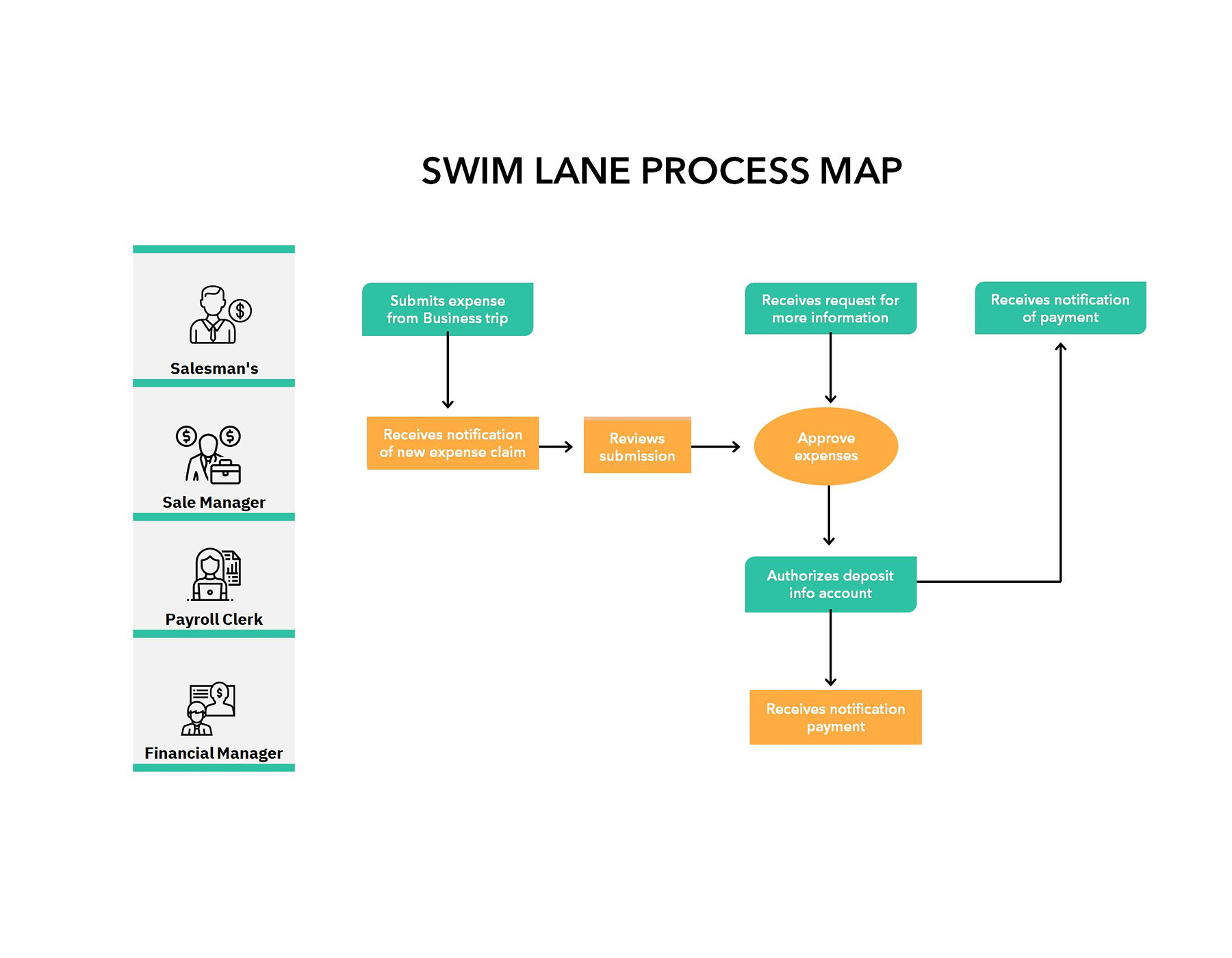
Swim Lane Process Map Template
8. The workflow process map template
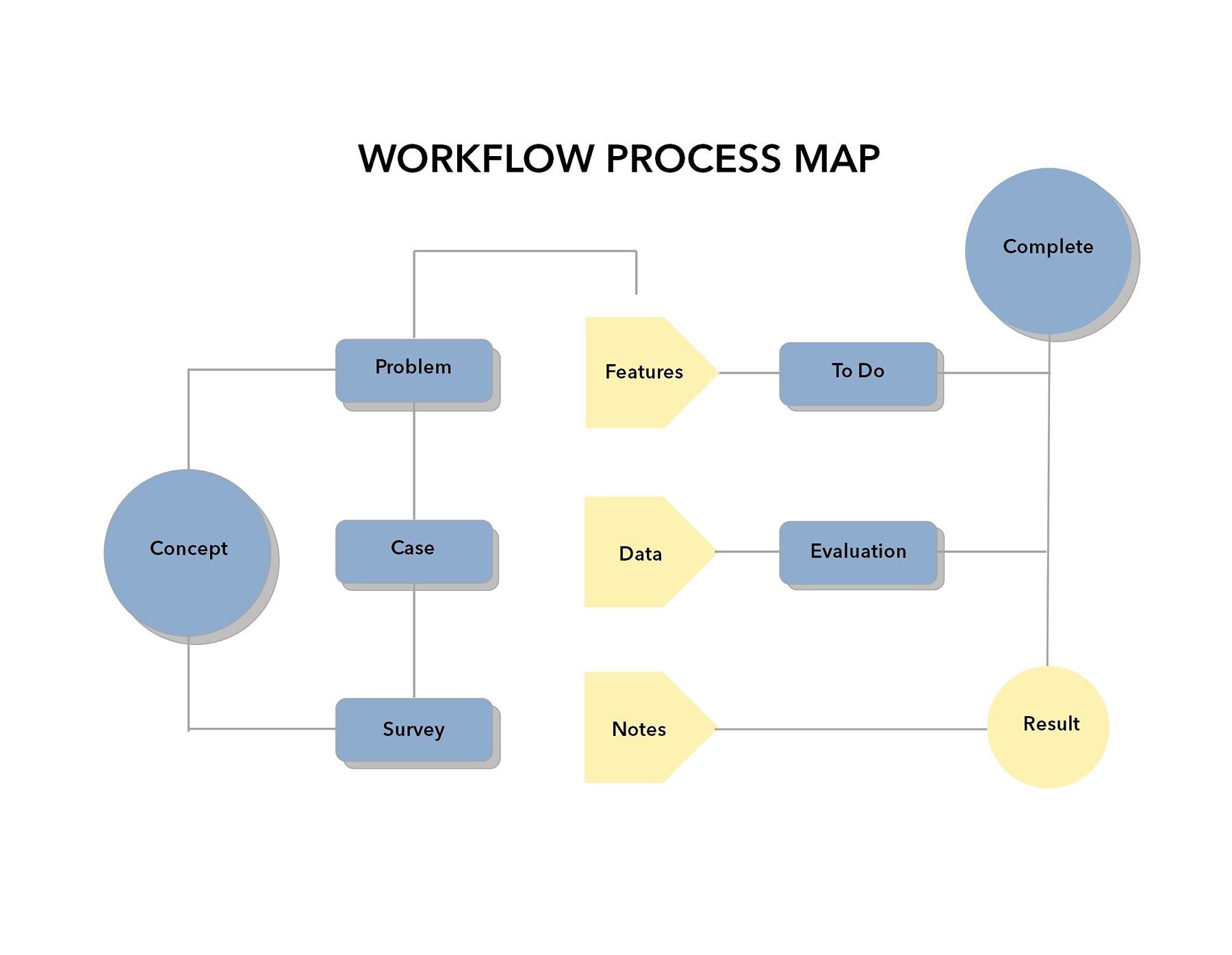
This is a versatile template that is designed to take you from core idea to a structured analysis toward a final result. It does not follow a linear flow as it branches out to show how different elements of a project are handled at the same time.
The discovery phase (the concept)
Everything kicks off with the Concept, which is the core idea or project goal. This step quickly branches into three main paths:
- Problem: Suggest the specific pain point you’re trying to achieve.
- Case: Developing the business case or logical framework for the idea.
Making a business case is tough, but with the templates, you can make it perfect and detailed. See the business case template to ease this process.
- Survey: Compile external feedback or market research to validate the concept.
The execution phase (features & data)
Once the foundation is laid, the process moves into the middle section that is mainly “how” of the project:
- Features & To-Do: In this, you will mention the specific functions of the project and turn them into actionable tasks.
- Data & Evaluation: Involves gathering important information and passing it through an evaluation process to make sure the data is accurate and feasible.
- Notes: It is a dedicated space where you put observations and qualitative insights that don’t always fit into the dataset.
The output (result & completion)
This is the final stage where your project sums up into two distinct endpoints:
- Result: The concrete outcome or data point generated by the workflow.
- Complete: The high-level status showing the project has been successfully closed out.
Workflow Process Map Template
Workflow Process Map Template
Real-World Process Mapping Problems and The Fix (Straight from Real Users)
If the process map is not built using the right technique, it can result in the following issues:
We documented the process, and no one followed it.
It is one of the frequent issues and usually happens when the document is too complex or just sits somewhere no one checks. As one Reddit user summed it perfectly:
SOPs Live… and go stale in weeks.
To make sure it doesn’t happen to you, keep the process map simple yet clear.
Our process changes every week, so mapping feels pointless.
Teams that are usually fast-moving and where things change instantly can face this issue frequently. The only trick is to treat your map like a living document, not something fixed forever.
Everything depends on one person who just knows how it works.
Well, here comes the classic problem. When only one person knows the real game, things fall apart quickly. So always make the map through collaborative effort where everyone knows how things and flow will work.
Our process map looks great… but it’s not how things actually work.
This happens when you set unrealistic expectations, which are far from reality. Many people pointed out that our process maps look simple and inaccurate compared to real workflows. Try to make a map that can be achieved in real time to avoid this problem.
No one knows where the bottleneck is.
A prominent issue is the lack of visibility. Teams usually don’t even understand the complete workflows, which leads them to guesswork and finger-pointing when things break. The fix is to use a right process map template so that everything is visible.
In short, the process map templates….
Is what you need to make a project or workflow work. It is not making workflows look neat; it is giving them a clear path. Mostly, teams don’t struggle because they lack effort; they struggle because they don’t have a clear plan, and processes are stuck in someone’s head. So, if you want your workflow and team to stay on track and your project to end well, grab the templates now and start working on them. The rule is simple: make a process map practical and direct.
Frequently Asked Questions
Do small teams even need process maps?
Why not? From small teams to large enterprises, process maps keep the chaos away and let your team work with clarity.
How detailed is too detailed?
The point where the map feels complicated and no one wants to use it is when it is considered too detailed. Always keep it simple and practical.
Can one template work for everything?
The generic templates can go for any situation. However, if something demands different processes, you need different approaches to work well.
About This Article