Let’s be real: most projects don’t fail because the team is incompetent. They fail because of “The Stealth Stakeholder” who doesn’t come to the kick-off meeting but shows up two months later to blow your entire timeline.
It’s a brutal cycle that almost kills 40% of the projects. You start with a great plan, but because “Dave from Legal” or “Sarah from Finance” wasn’t in the loop, expectations get blurry. Suddenly, you’re not building a project for anyone; you’re a full-time firefighter trying to fix communication gaps.
This is exactly why a Stakeholder Map is a literal lifesaver. This doesn’t let you sink in the sea of messy emails and random Slack pings; instead, it gives you a clear, visual breakdown of who is involved and what they are bringing to the table at what cost.
But here’s a thing: setting it up might seem like a chore, and you aren’t sure how mapping will work. That’s why templates are designed to make everything easy.
In this article, we’re going to break down what stakeholder mapping is and how a simple template can stop the “shuffle” and keep your project and your sanity on track.
So, What’s Stakeholder Mapping?
Suppose you’re running a project and there are several stakeholders involved in it. This map tells you simply how many people are involved and on what level they hold power. The best part?
The map removes the struggle of reading long email threads to know about names, roles, and expectations. Having this, you can easily find out who needs to be consulted in important matters and who just needs occasional updates.
When Do You Need a Stakeholder Map?
- During project planning to identify the right people early.
- When you’re managing complex relationships to understand influence and expectations.
- When prioritizing communication, in order to decide who needs detailed updates and who needs just an overview.
A Must-Have’s of an Effective Stakeholder Map
If you don’t know what to add to the map, and how it works best, then what’s the point of making it? Generally, it is not meant to be complicated, as adding plies of information just dilutes it. Make sure it has important but enough details, so your team understands who matters and on what level:
Stakeholders roles and Responsibilities
First off, it must have this section. Here, you list down all the stakeholders and define what role they play. Some people make decisions, some provide support, and others simply need to know what’s going on.
Level of influence and interest
Not all contributors have the same kind of influence and interest in the project. Some have the power to shape all the decisions, while others are just looking for the outcome. Once you have mapped this, it is easy to prioritize which you need to run in important decisions.
Communication needs and expectations
This section lays out how much information is given to each stakeholder. Not everyone needs the same updates. A few may ask for detailed progress, while others only want quick updates. Understanding these expectations is necessary as it makes it easier to plan communication without overwhelming everyone.
Relationship between stakeholders
This is also an essential part of mapping. Think of it as a “connection map”. Staekholers don’t work in a bubble; they are constantly linked to decisions, overlapping duties, or daily teamwork. By figuring out these invisible lines, you stop seeing people as just names on a list. Instead, you see a web of influence and how they relate to each other.
7 Free Stakeholder Mapping Templates to Simplify Stakeholder Analysis
Our templates are not set in stone. You can edit and customize them according to your preference. Let’s explore some free, ready-made templates:
1. Project stakeholder map template
When tracking every partner in a project becomes difficult, this template can help you manage everything without getting lost in endless emails or notes.
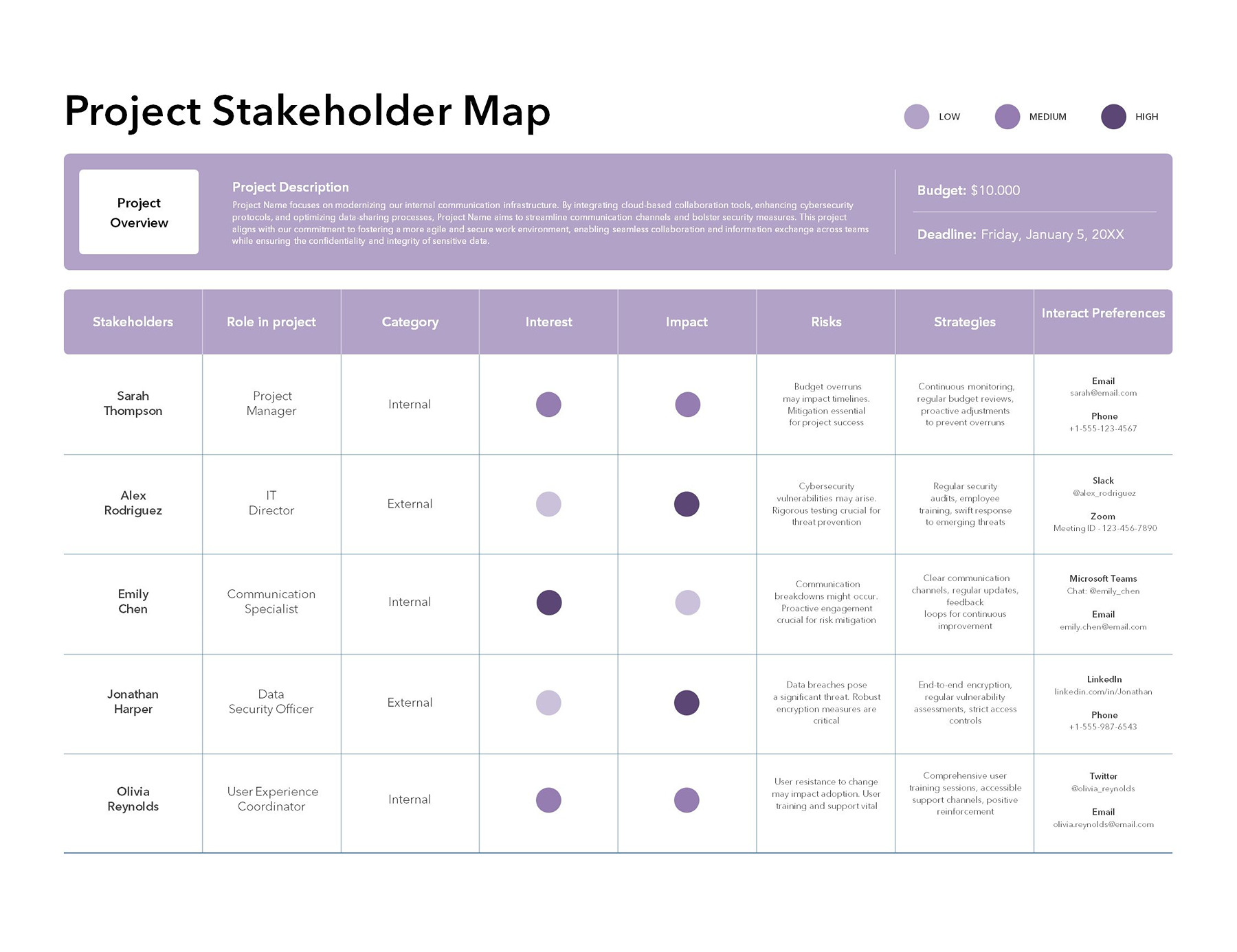
What’s included in this:
- Right at the top, you will see a project overview section, which is where you will briefly explain about your project and other important details. such as a budget or a deadline
- Below the overview, there is a stakeholder table that consists of important details about the partners.
- Start by mentioning the names of the people involved in the project in the stakeholder section.
- Next (role in project column), you will add the responsibilities/designations against each person. (for instance, communication specialist, IT director, project manager, etc).
- The category section will help you identify whether the stakeholder is internal or external to the organization.
- Next, you will color the interests of each stakeholder, which depicts the level of involvement in the particular project.
- The same goes for impact, which shows the influence of each person on project decisions or outcomes.
- The risks column indicates the potential issues or concerns related to each contributor, such as a busy schedule or time zone issues.
- You will see the strategies column in almost every template where you write approaches to engage or manage each contributor.
- At the end, you will mention how a stakeholder wants to communicate, such as either through email, Slack, Meet, or phone, in the interaction preference section.
2. Stakeholder engagement map
The template is not like an ordinary mapping template. It basically acts as your project’s “central nervous system.” Instead of writing names in a spreadsheet, it helps you visualize clearly how each player connects to the core project.
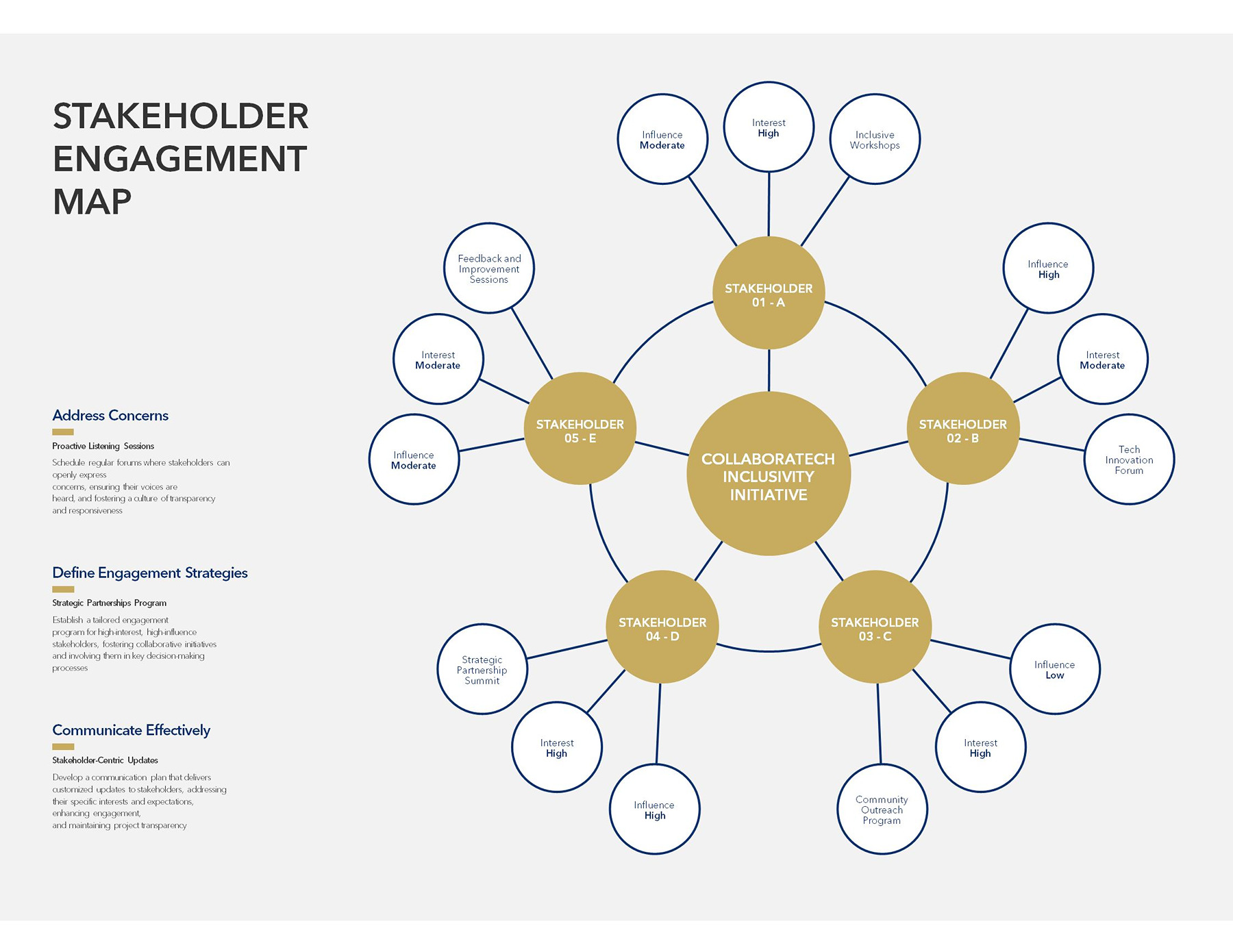
Here is the breakdown of how it works:
- The “big gold circle” right in the middle is your project heartbeat. Everything else on the page exists only to serve this one goal. Write according to what you want at the end of a particular project.
- The five gold orbits labeled Stakeholder A through E are the main characters (VIP). In short, you can say that these are the people who can either make your project a success or shut it down tomorrow. By listing their name, you’re admitting: “These are the 5 people I need to keep happy.
- Each gold orbit, as you can see, has three little white bubbles popping out of it. This is where you will explain the real strategy:
- Influence: You will mention how much power each VIP has. (Can they fire me or cut my budget?)
- Interest: How much do they actually care about the initiative? (Are they checking email every day, or communicating on a monthly basis?)
- Feedback sessions: It shows which specific way you talk (engaged) to them, like a tech forum or a workshop.
- On the left side, the template translates the visual map into a clear strategy and breaks it down into three straightforward vibes:
- Address concerns: Using proactive techniques to catch issues earlier
- Define engagement: Creating a strategic partnership for people who have a strong influence, so they don’t feel side-kicked.
- Communicate effectively: Adjust updates according to each person so that you’re not spamming everyone with the same emails.
3. Stakeholder heat map
This template is used as a strategic risk assessment tool that can help you visualize the impact and potential harm related to key stakeholders in the project. Think of it as a warning system that shows you exactly where the “fire” might start before they actually break out.
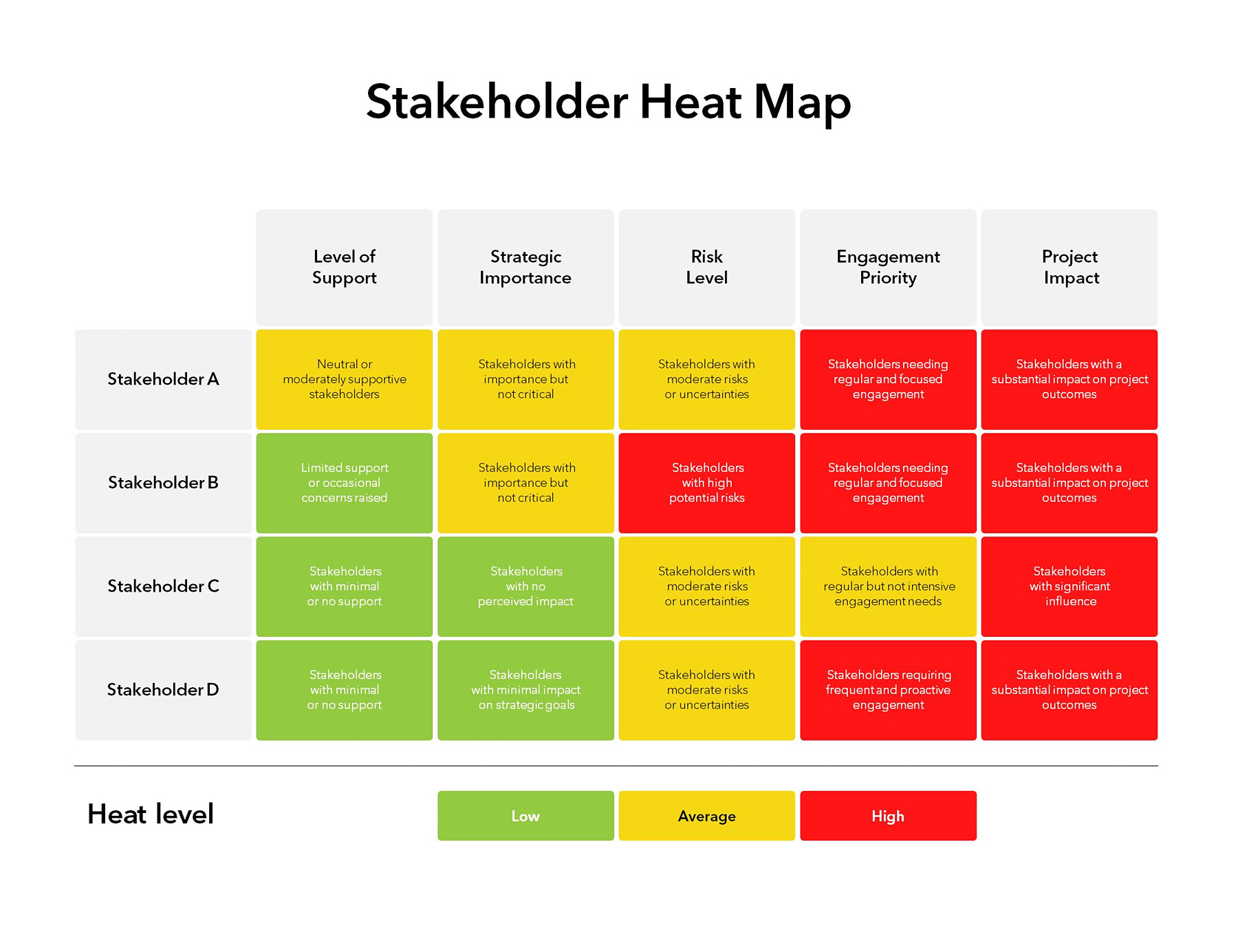
How this template works:
- Before we explain the columns, first, let’s understand how the color-coded risk scale works:
- Green (Low): These people are “low maintenance”. Means you don’t need to worry much about them as they aren’t a threat to the project.
- Yellow (Average): This shows stakeholders who require moderate attention and have a certain level of influence. They’re important but not an emergency.
- Red (High): As shown in the image, these are your danger zones. If you see red in a row, this means the stakeholder requires immediate, proactive attention and communication.
- Now let’s have a look at the table map. As you can see, each stakeholder is scored or assessed across five categories:
- Level of Support: It reflects how much support a stakeholder is offering in a project. Do they actually like this project?
- Strategic Importance: How much do you need them? A Red here means the project literally can’t happen without their approval.
- Risk Level: How often are they likely to change their mind or cause a problem? High risk means they are unpredictable or have a history of changing their minds.
- Engagement Priority: How often do I need to talk to them? Red shows you need to be talking to them constantly, while yellow means a weekly update is enough.
- Project Impact: If this person gets “grumpy”, how bad is it? Red means they can blow up the whole timeline.
- Now you understand the template. Fill in the information accordingly. The goal is simple: you want to move as many things as possible towards Green, or at least make sure you have a plan for everyone in Red.
4. Stakeholder journey map
The template is used when you need to see a project from someone else’s shoes. Instead of just looking at what you need from them, you’re analyzing what their life looks like while they deal with your project.
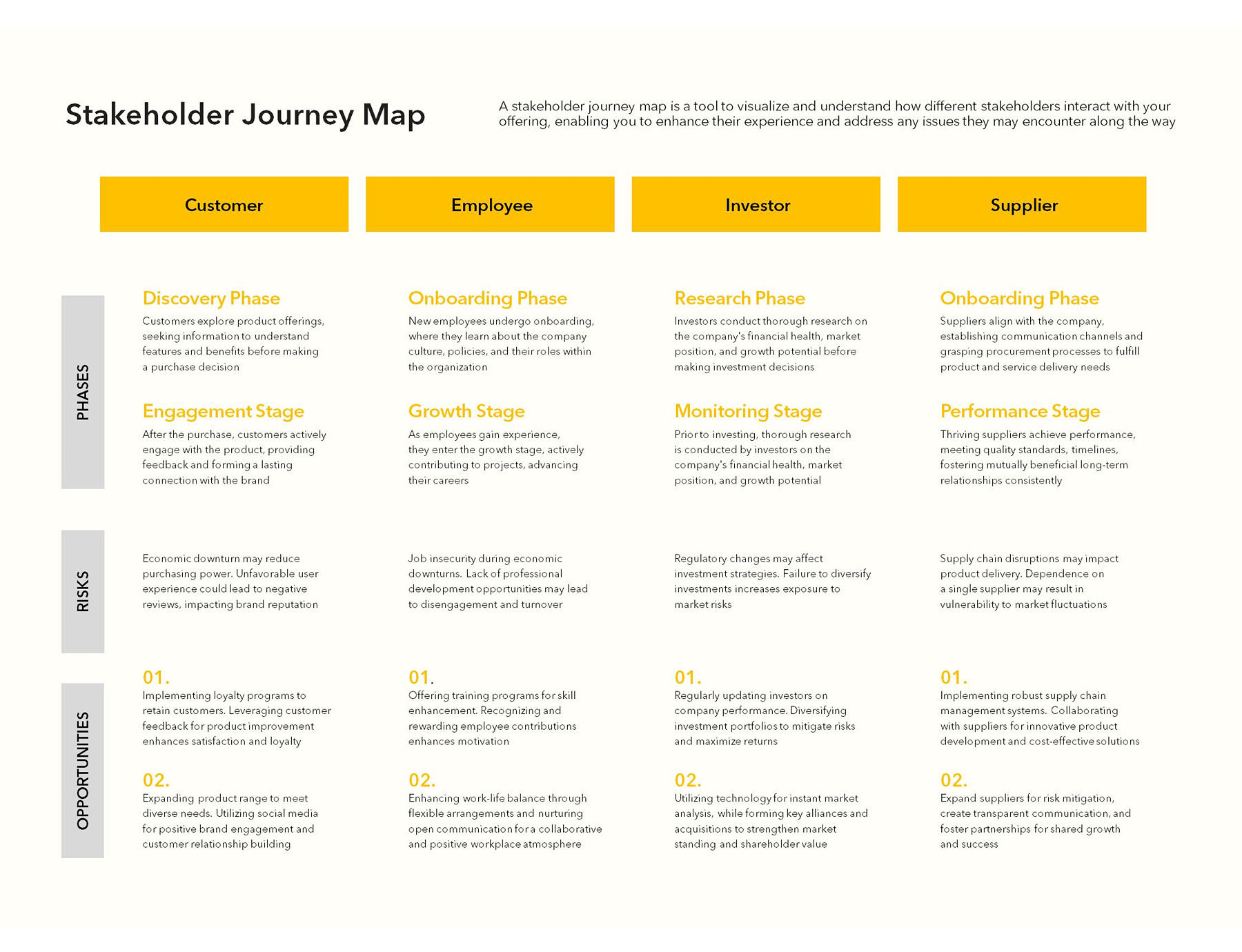
Breaking down the template:
- In the horizontal axis, you will group the stakeholders that are essential for the project, each with different needs and perspectives. For instance, in the picture, you can see four primary groups (customer, employee, investor, supplier).
- For each group, generally, the template breaks down into three critical layers (vertical axis:
- The first one is a journey or phases. This typically indicates the lifecycle of the relationship, like how a role starts with an initial stage (discovery/ onboarding/research) and gets into the secondary stage (engagement/growth/performance).
- The risks usually explain the barriers or any external or internal threats that can damage a relationship. For instance, it might be economic downturns for customers, job insecurity for employees, or regulatory changes for investors.
- The opportunities are basically the solution part of the template. It contains certain strategies to improve the stakeholder experience, such as free vouchers for customers, training for employees, or transparent communication for suppliers.
5. Stakeholder management map
The template acts as your “Field Guide” through which you figure out how to handle different stakeholders based on involvement and power level. It is not a simple template that treats everyone the same; rather, it divides core partners into sections depending on how much impact (high vs low) they have.
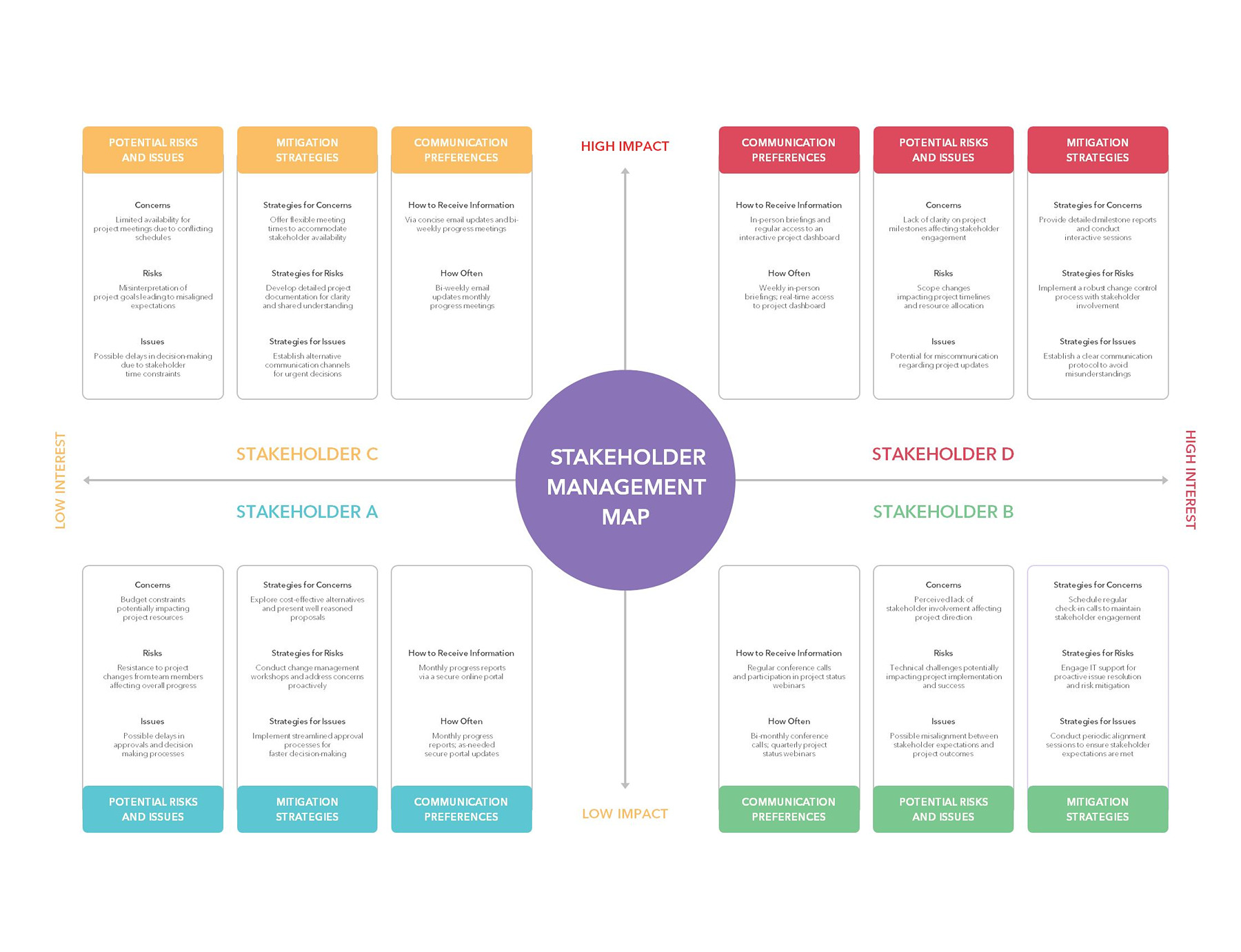
Understanding the template:
- As you can see, the map is split into four quadrants where you input the key stakeholders on the basis of high vs low impact and interest.
- At the top right (Stakeholder D – Red) are basically the critical players. These are the ones who have high impact as well as influence.
- In the top left (C – Yellow), you will add key contributors, meaning they might have a high impact but less day-to-day power.
- The bottom right quadrant (B – Green) includes your supporters/observers who have a lower impact, but you still need to engage them so they don’t feel ignored.
- Additionally, at the bottom left (A – Blue), you will add low-impact players. You need to keep them informed occasionally.
- Once you add the stakeholders, for each of them, you will fill out the three columns:
- Potential Risks and Issues: What could go wrong with this stakeholder?
- Mitigation Strategies: How do you plan to handle those risks?
- Communication Preference: How and how often you should keep them updated?
6. Stakeholder relationship map
The template is all about showing how different stakeholders are related to each other within a project or organization. Instead of just abruptly listing people, it lays everything out in a structured, almost org-chart style, so you can see who reports to whom and teams are linked.
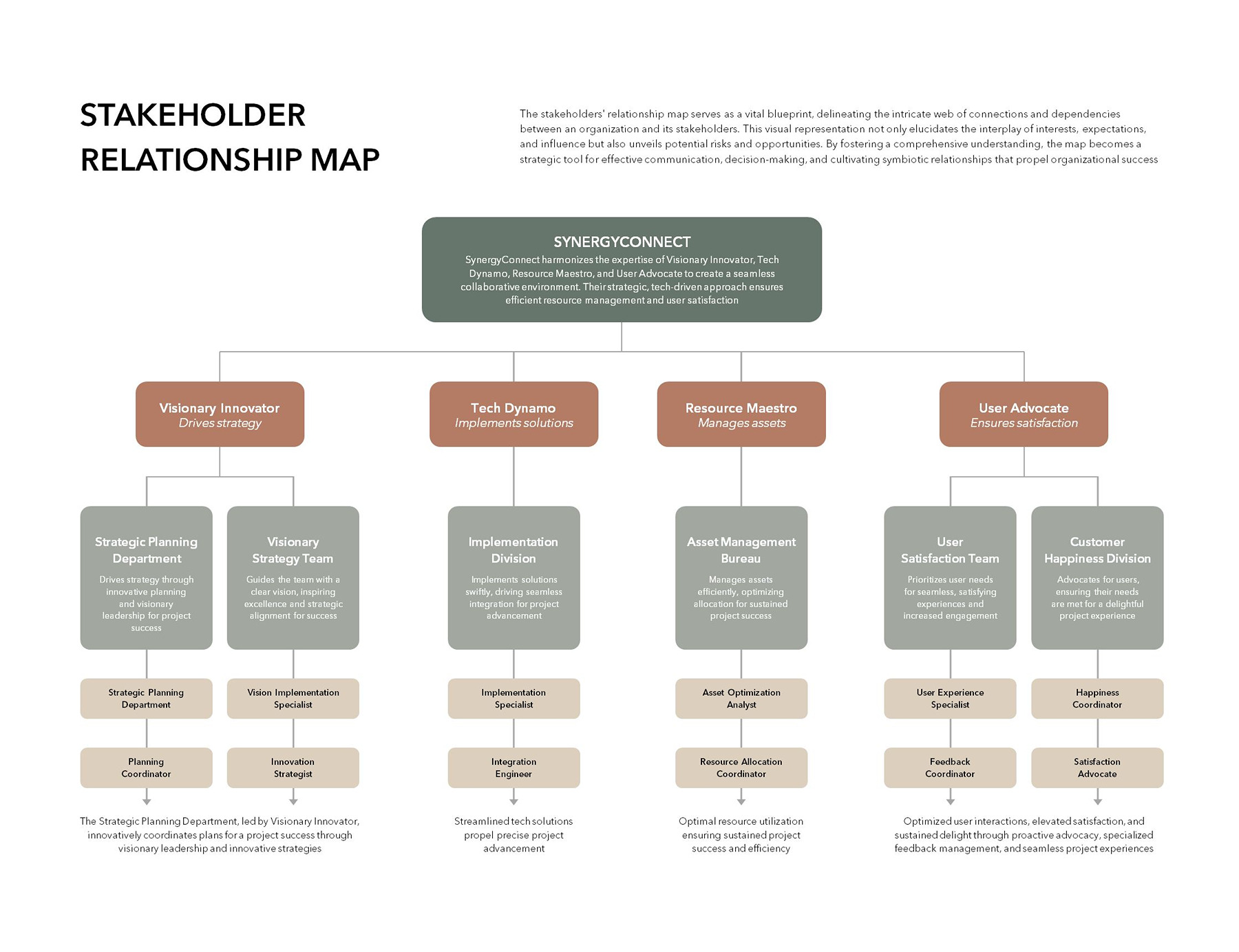
What’s included in this template:
- At the top center, you’ll see the Organization or Project name. This is basically a “Parent” box that explains the overall mission everyone is working towards.
- Below this, you will see pillar leaders where you add the key Stakeholder Roles. These are the functional heads of the project, like the project lead, visionary manager, a tech dynamo, etc.
- Each pillar leader breaks down into functional departments. Now what to do here? Well, you’ll list the specific Division or Teams. It shows which team or support system is working under each leader.
- At the bottom of the chain, you’ll mention the individual roles or specify titles such as Program Coordinator or Integration Engineer.
- Once you are done with assigning and naming, you will adjust the connecting lines between boxes to show reporting paths. If a line connects two boxes, it means those people need to stay in touch.
- Moreover, in the description of each box (responsibility bracket), you shortly mention what they do (e.g., manage assets or drive strategy). By doing this, you can prevent two people from accidentally trying to do the same job.
Are these templates etched in stone?
Absolutely not. These templates give you a strong head start, not a final rulebook. Since they come in Google Slides, they are completely flexible. You don’t have to waste hours staring at the blank screen or drawing boxes from scratch. To make it your own, just pick the layout that fits your project’s vibe, click into the placeholder, and start typing. If you don’t want a specific column or row, you can delete it. That’s it!
Tips for Making Stakeholder Mapping More Powerful
Everyone knows how to make a simple stakeholder map using a template, but if you want to get an edge and make it more effective, here are some tips:
- Focus on the Most Influential Stakeholders: Make one thing clear: you can’t please everyone equally. Use the Power-Interest Matrix to evaluate the key players. These are the people who have the power to stop the project. Spend 80% of your energy here.
- Keep the Map Simple and Visual: Do not make your map a tax return document. Use color, shapes, and clear lines. Additionally, if a stakeholder can’t understand their role on the map in 30 seconds upon looking at it, it is surely too complex.
- Update Stakeholder Information Regularly: Projects are living things, so treat them like that. A stakeholder who was “Neutral” in January might become “Active” in March because of a budget shift. Set a monthly calendar reminder to do a “vibe check” on your map.
- Involve Your Team in the Mapping Process: Don’t map in a vacuum. Your lead developer might know that the CTO is worried about security, while your marketing lead knows that the CEO is obsessed with the launch date. Combining these perspectives avoids blind spots.
Common Stakeholder Mapping Challenges (and How to Handle Them)
Here are some common mistakes that people might take for granted, but they become a real hurdle eventually:
Identifying hidden stakeholders
- The Challenge: We often ignore “silent” influencers such as executive assistants or a finance head, who carry massive weight but aren’t on the stakeholder chart.
- The Fix: For this, ask every partner: “Who else needs to be on board for it to be a success?” Their answers will help you find the hidden gems.
Managing conflicting interests
- The Challenge: When multiple people combine, they surely have different priorities. For instance, Stakeholder A wants it fast: Stakeholder B wants it perfect.
- The Fix: Simple, use the Stakeholder Relationship Map to find the common goal. Moreover, bring them to the same table early to negotiate how things will go further.
Keeping stakeholder data up to date
- The Challenge: You can’t guarantee that someone will stay at the end. People change roles, leave the company, or simply lose interest.
- The Fix: The best possible way is to assign an “owner” to each high-impact person. Its job will be to keep a pulse on those specific relations and update the map if something shifts.
So, Before You Plan Your Next Project…..
Take a moment to think who is involved and what value they are putting on the table. A lot of issues, as you know, don’t come from poor execution; they come from missed expectations and unclear communication. To make this process a breeze, stakeholder mapping is all you need. With the right template, you don’t need to overthink the process. Just think about key players, and add them to the template with their key roles and influence. The best part? These templates are quick, practical, and easy to use.
Frequently Asked Questions
Can Stakeholder mapping templates be customized?
Of course, and they should be. A template acts as a foundation, not a set of rules. You can add or remove columns based on your project needs.
Which format is best for these templates?
It really depends on how you like to work. If you want something quick and visual, Google Slides works great. But for detailed tracking, Excel or Google Sheets might be a better choice.
About This Article