Training employees sounds simple until you actually have to organize it. One person requires onboarding, another needs software training, while someone else missed the compliance session, and all of a sudden, you’ve got your head in spreadsheets, notes, and endless reminders. Sounds like full chaos?
Don’t worry, we’ve got a plan for you. If you want to escape such a situation, you definitely need a good training plan template. Why? Because it helps figure out who needs which training, what they need to learn, and when it needs to happen, in a pre-built format.
Plus, it keeps things in place without making the whole process complicated. So, if you’re managing small teams, running HR tasks, planning workshops, or training an entire department, the right template will definitely be your lifesaver.
In this guide, we will go through different types of training plan templates, what they typically include, and how they can help you. Let’s get started:
So, What Exactly Is a Training Plan Template?
If we explain it in simple terms, it’s the easiest way to organize employee training without turning the whole process into a mess. The best thing is you don’t need to make anything from scratch every time someone joins the team or needs a new skill; the template has it all. It helps you outline things like who needs training, at what time, who is responsible for it, and how progress will be tracked. You can also take it as the roadmap that keeps you on track.
Additionally, most people think that a good training plan is all about scheduling or checking boxes. Not exactly; it should actually help employees learn in a practical and manageable way. A superb plan usually has clear goals, realistic timelines, proper resources, and a simple way to observe improvement.
If you consider this an odd thing, let me know that training plans play a bigger role in business growth than most people realize. Well-trained employees tend to work confidently, learn faster, and make fewer mistakes.
Over time, it increases team productivity and overall workplace performance. Moreover, companies usually start relying on training plans during onboarding, software implementation, compliance updates, or when the team needs to learn new skills to keep pace with the ongoing needs.
The Building Blocks of an Effective Training Plan
A training plan only works best when it’s formed in a way that people actually follow. So, in case you wonder what makes a template perfect, here are a few simple building blocks.
1. Learning goals and expected outcomes
Keep in mind that if you don’t have clear goals for a training plan, it might be a failure. That’s the reason every template has a section where you write what employees need to understand, why it matters, and what the results are once the training is complete. If you have defined outcomes beforehand, it lets everyone focus and gives the training a real purpose rather than feeling random or rushed.
2. Training timelines and milestones
Trying to teach everything at once doesn’t work. That’s why a template includes this part where you write timelines and smaller milestones to break the project into manageable steps. This makes everyone learn at a steady pace while letting managers track progress easily throughout the whole process.
3. Assigned trainers and responsibilities
A useful plan, similarly, also makes it clear who’s responsible for the training process. So, whether you’re a manager, HR, supervisor, or senior employee, having a specified trainer keeps communication simple and gives employees someone to turn to for guidance and support.
4. Resources and learning materials
If your learning material and resources are sorted from the start, this helps you move the process more smoothly. That’s why every basic template gives you a spot to drop in everything your team needs, such as software credentials, presentations, documentation, quick videos, and practice assignments. Honestly, the easier it is for people to get their hands on resources, the quicker and better they’ll learn.
5. Employee progress review
Plus, when you’re running a training plan, you’ve absolutely got to keep tabs on how things are going. Regular lookups are a total game-changer because they let organizers see if the training is actually beneficial, how everyone is performing, or if they need to tack on a few more sessions. Dropping in simple evaluations, quick feedback chats, or casual skill assessments makes a massive difference in the final results.
6. Completion tracking and feedback
A template is incomplete if it doesn’t add post-evaluation feedback or properly document everything once it’s finished. So, at the end, you will get this section where you can write feedback about employees and any plans.
Training Plan Formats for Different Workplace Needs
If you think one template can act as a full show in every situation, well, you’re wrong. There are different formats available depending on the training type and structure. Let’s have a look:
If you want to arrange a workshop from scratch (HR teams, trainers, companies):
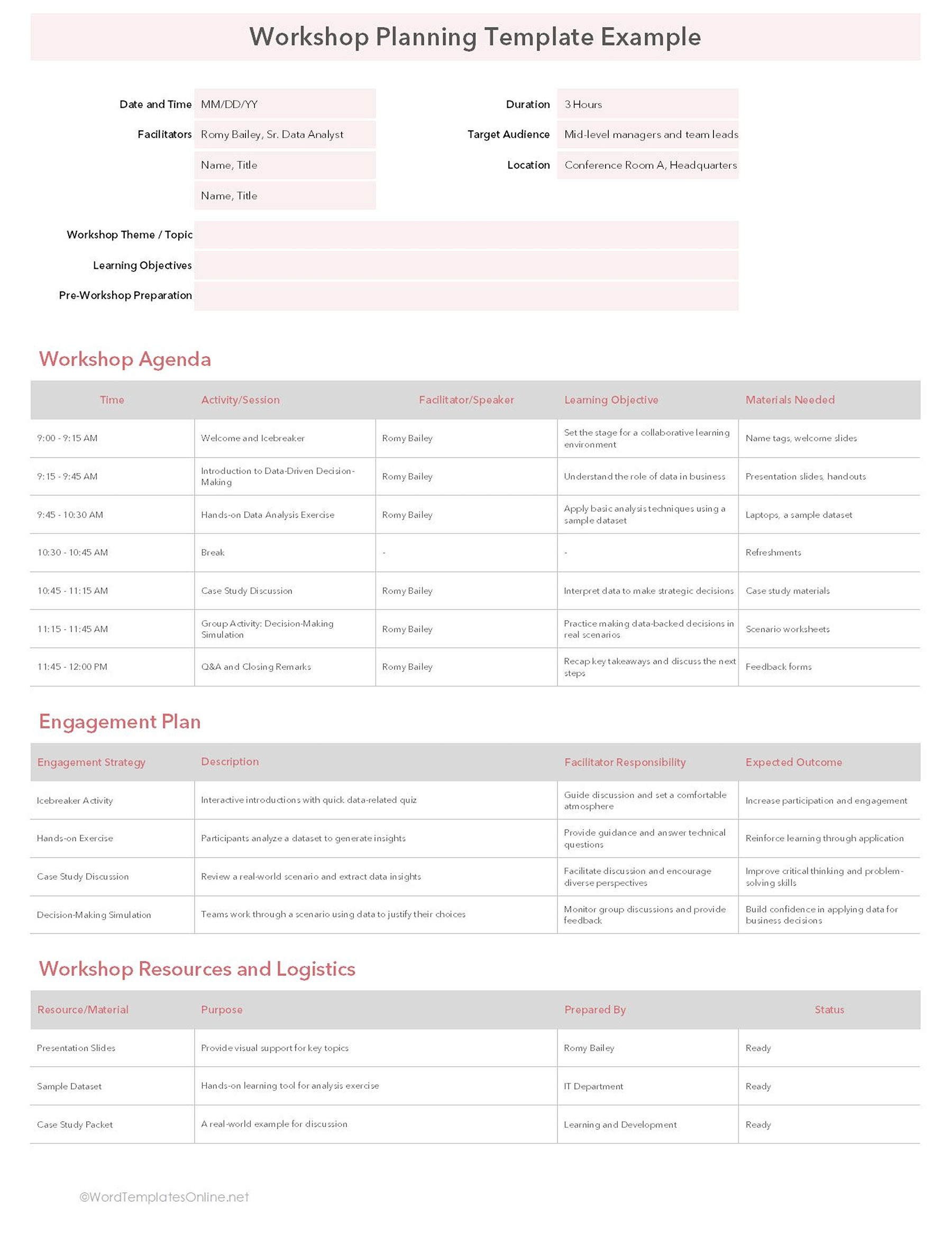
Then, definitely, a workshop planning template is your way to go. Kicking off with basic details like every template has ( date, time, duration, organizer, location, target audience, and learning objective), the template gives a complete overview of what you’re going to learn in this workshop.
Workshop Planning Template
Workshop Planning Template
As you can see, it’s really a detailed layout and has many sections. Out of them, the Workshop Agenda is one of the most important. This allows you to break the workshop into time slots and explains which activity or session will happen during each part of the day. Not only this, but it also includes who’s leading the activity, what the learning goal is, and what resources are needed.
Furthermore, it also has an Engagement Plan, which is really a smart addition because workshops work best when people actually participate rather than just listening the entire time.
In this section, you write activities such as discussions or any exercises along with the expected outcomes. Right below, you’ll also find a section headlined as Workshop Resources and Logistics, where organizers keep track of things like presentation slides, handouts, or any other material needed during the session. This literally helps avoid last-minute scrambling.
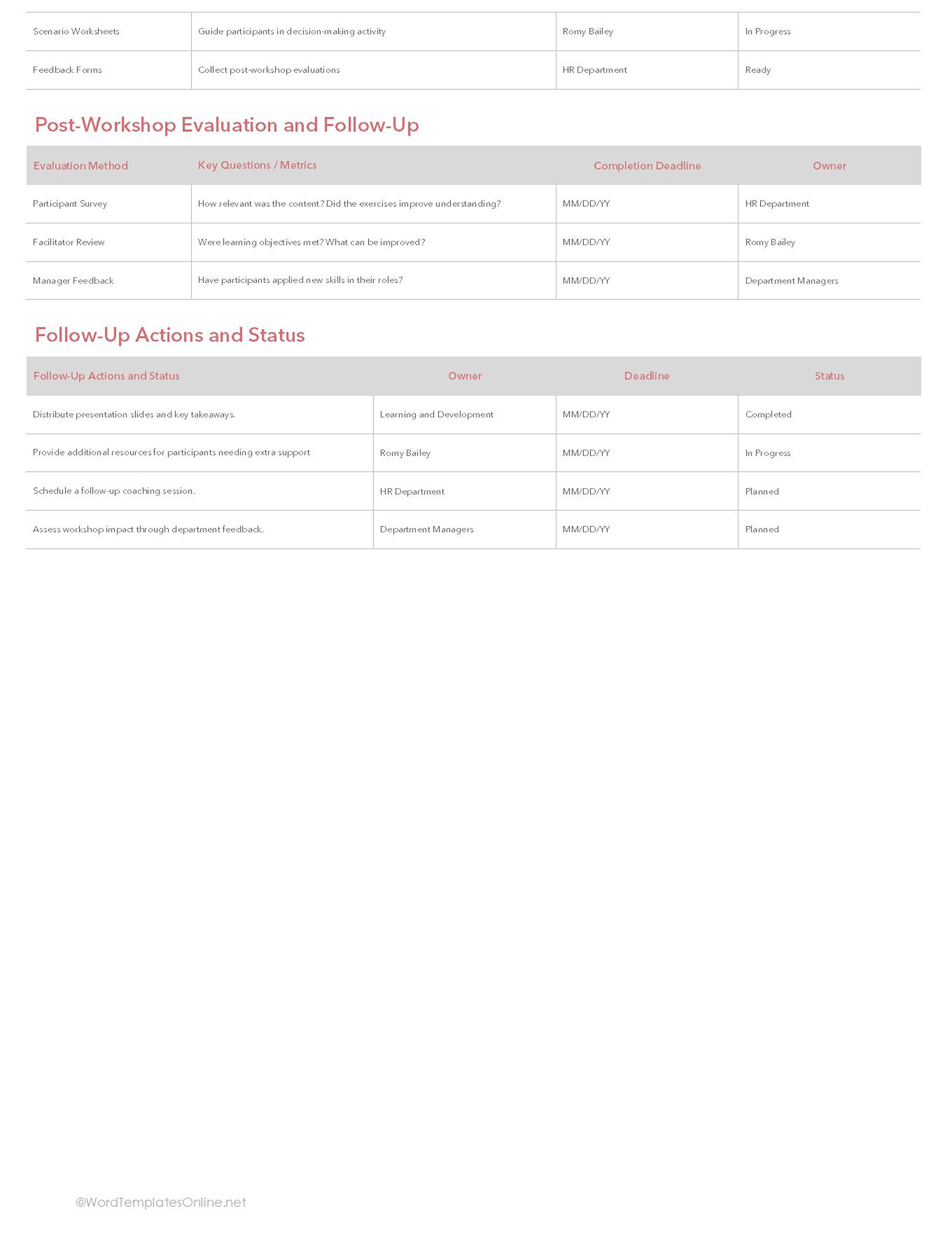
Towards the end, the template takes its focus to post-workshop tasks such as receiving feedback, reviewing learning outcomes, and assigning what’s next. Plus, there’s also a part where you can check out responsibilities, deadlines, and progress once the training is completed.
If you are going to conduct a software learning in a clear and step-by-step format:
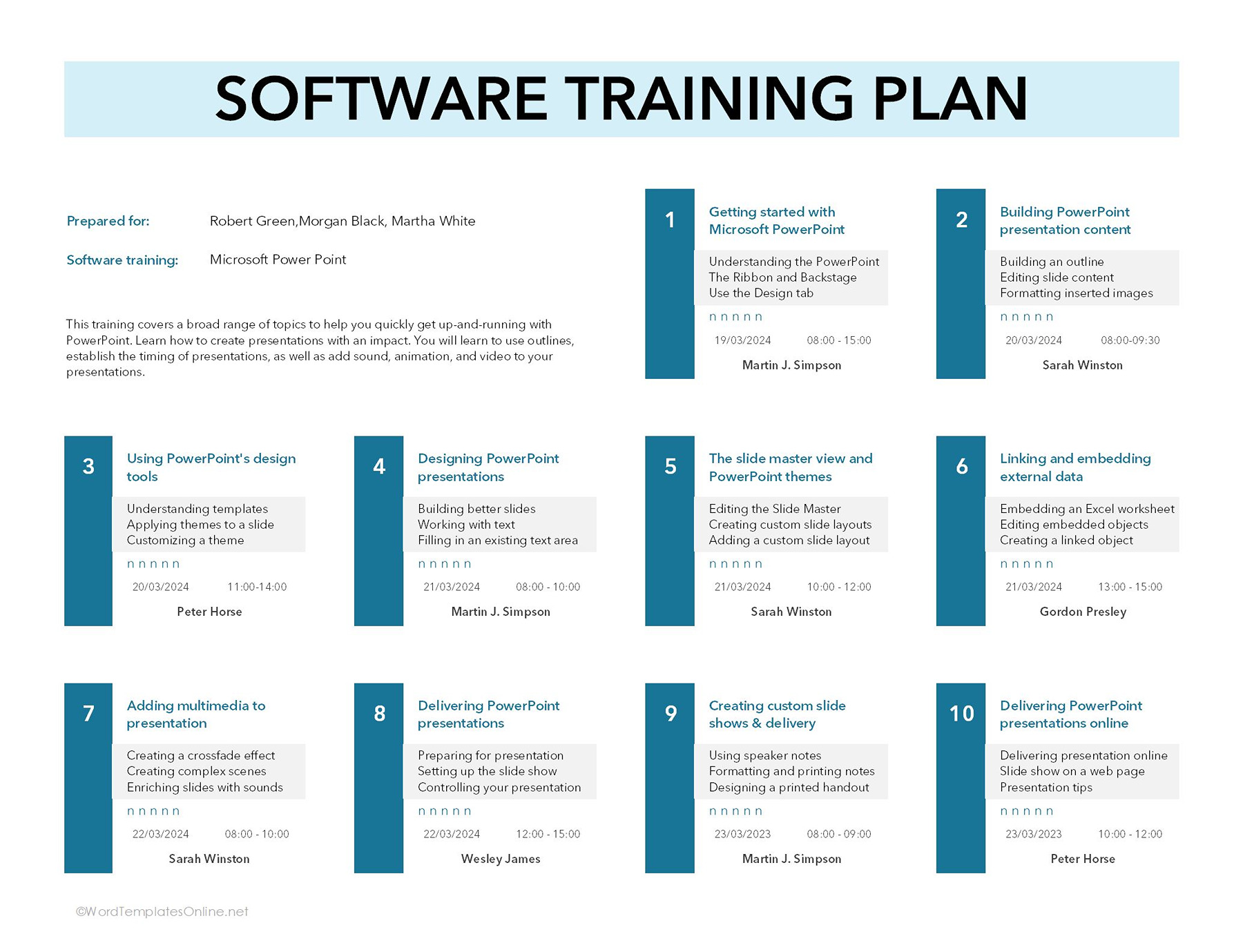
The software training plan template is a perfect fit if you want to teach your employee a new skill. Usually, in such scenarios, the training leans towards specific skills and breaks the entire learning process into separate sections instead of exhausting the employee in a single go.
Software Training Plan Template
Software Training Plan Template
At the top, just fill in the important details like who the training is prepared for, what software is being taught, and a short overview of the participant (if possible). Now comes the main part, which is divided into numbered training modules. Well, this makes the entire learning process really easy, as each section focuses on specific topics. While adding the topic details, you can also link resources or mention session timing, dates, instructor, and small learning points for each module.
What makes this template extremely useful is how simple and effective it’s designed. Employees can clearly see what they’ll be learning in each session, while trainers can manage the schedule without confusion.
If you’re looking for a skill training & development tracker:
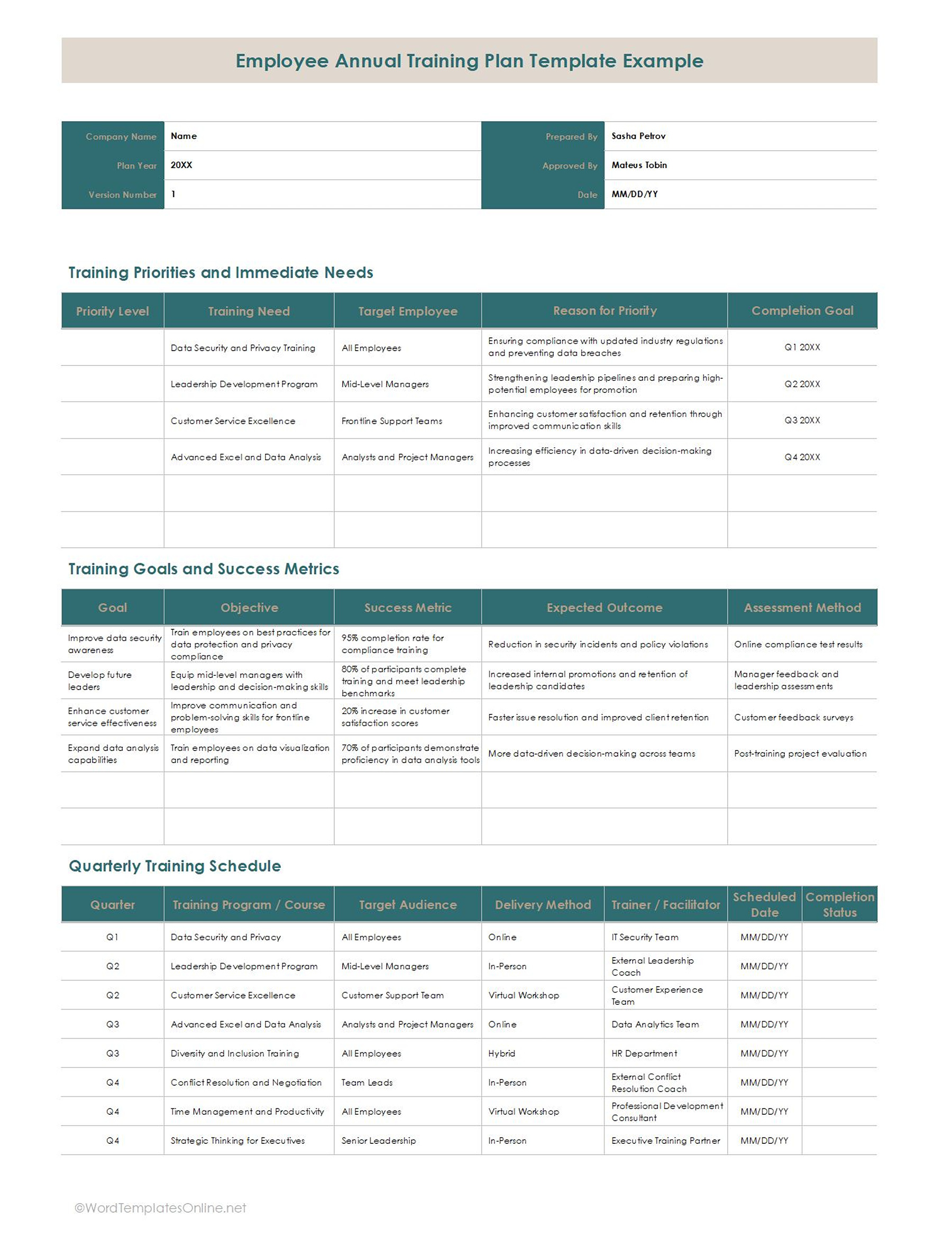
You must go for a skill training plan template, as it acts as a personalized roadmap for an employee to level up their career skills. With this, you don’t need to wing it, as it gives managers and employees a step-by-step game plan to turn their weaknesses into strengths.
Employee Annual Training Plan Template
Employee Annual Training Plan Template
Here’s how it broke down section by section:
The basics are placed at the very top, which includes who is getting trained, their role, their manager, and the exact skill they want to focus on. The next part is the skill development plan, where you tell a little backstory, such as how good a person is right in that particular skill, where they should be, and who is mentoring them to get there.
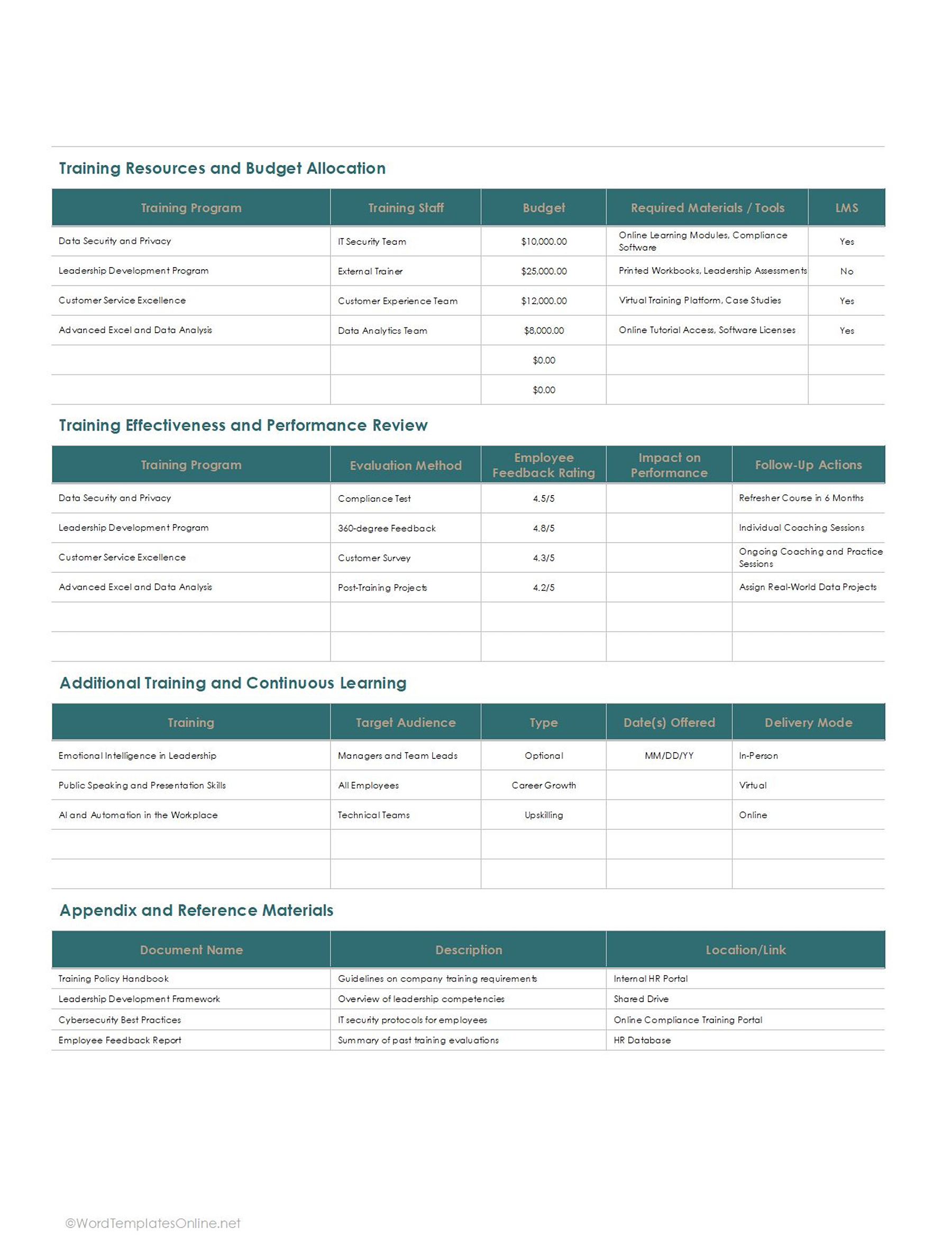
In the training and activities sessions, you prepare and schedule the learning. It defines the exact resources being used, for instance, if it’s an online course, a live workshop, or 1-on-1 coaching. Well, learning theory is great, but practical applications and projects are what enhance credibility. In this part, you will mention how a person puts new skills to work on real company projects with specific goals.
The skill proficiency section is the test phase where scores and evaluations are usually mentioned. It generally indicates if an employee hit the target or if they need more practice. Lastly, you will need to add a quick check-in at the bottom, such as feedback from the employee and any kind of adjustments from the manager if needed.
If you want a comprehensive role-specific and employee development checklist:
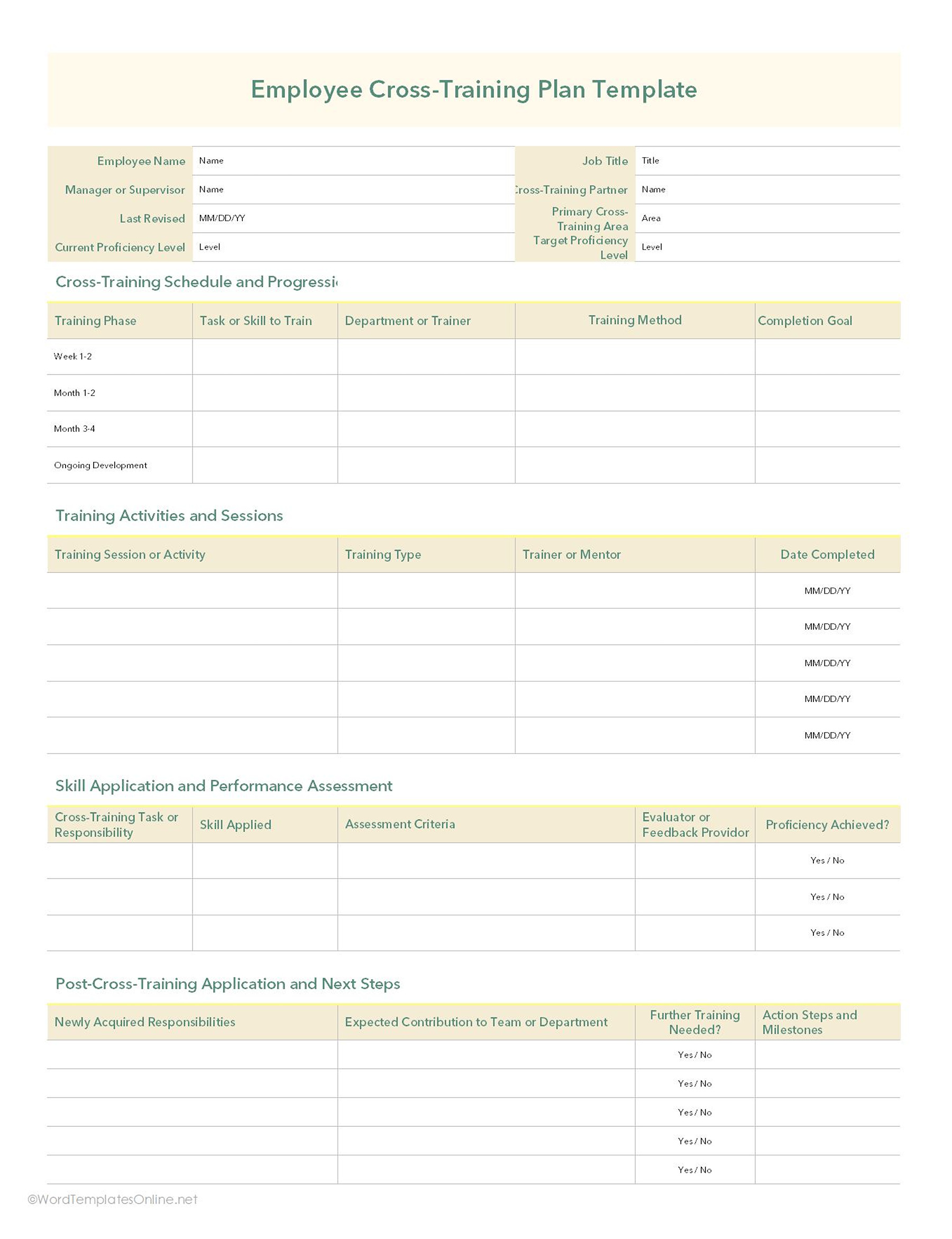
The template is the ultimate employee development layout for a new hire or someone who is stepping into a brand-new role at a company.
Employee Cross Training Plan Template
Employee Cross Training Plan Template
You start by putting the essentials, such as who the employee is, their joining date, and who’s managing their training. The next box indicates the main core skills required for the job and what performance expectations the company actually has for them.
You will see the role-specific training section, which usually follows the 30-60-90 day roadmap. Now what is it? Basically, it splits the training down into different phases: Week 1, Day 30, Day 60, Day 90, and continuous growth. The main purpose is to keep employees engaged so they don’t feel exhausted.
The score and evaluation box is where you number (grade) the process, write about the employee’s strengths, pinpoint areas for improvement, and track any special certifications required for the role.
Next, two sections are considered the collaboration log. The training sessions attended are a simple list that checks formal classes or workshops, including the dates, hours spent, and specific topics covered. Because we cannot overlook 1-on-1, the last section lists check-ins with assigned mentors or coaches so nobody drops the ball on feedback.
If you’re onboarding a new hire:
Onboarding is really a hectic process, but this template literally makes this process a breeze. Anyone who is looking to welcome a new team member must go for this one, as it removes the struggle of dumping a mountain of paperwork on a new hire’s desk on day one and puts the entire onboarding journey on one page.
Onboarding Training Plan Template
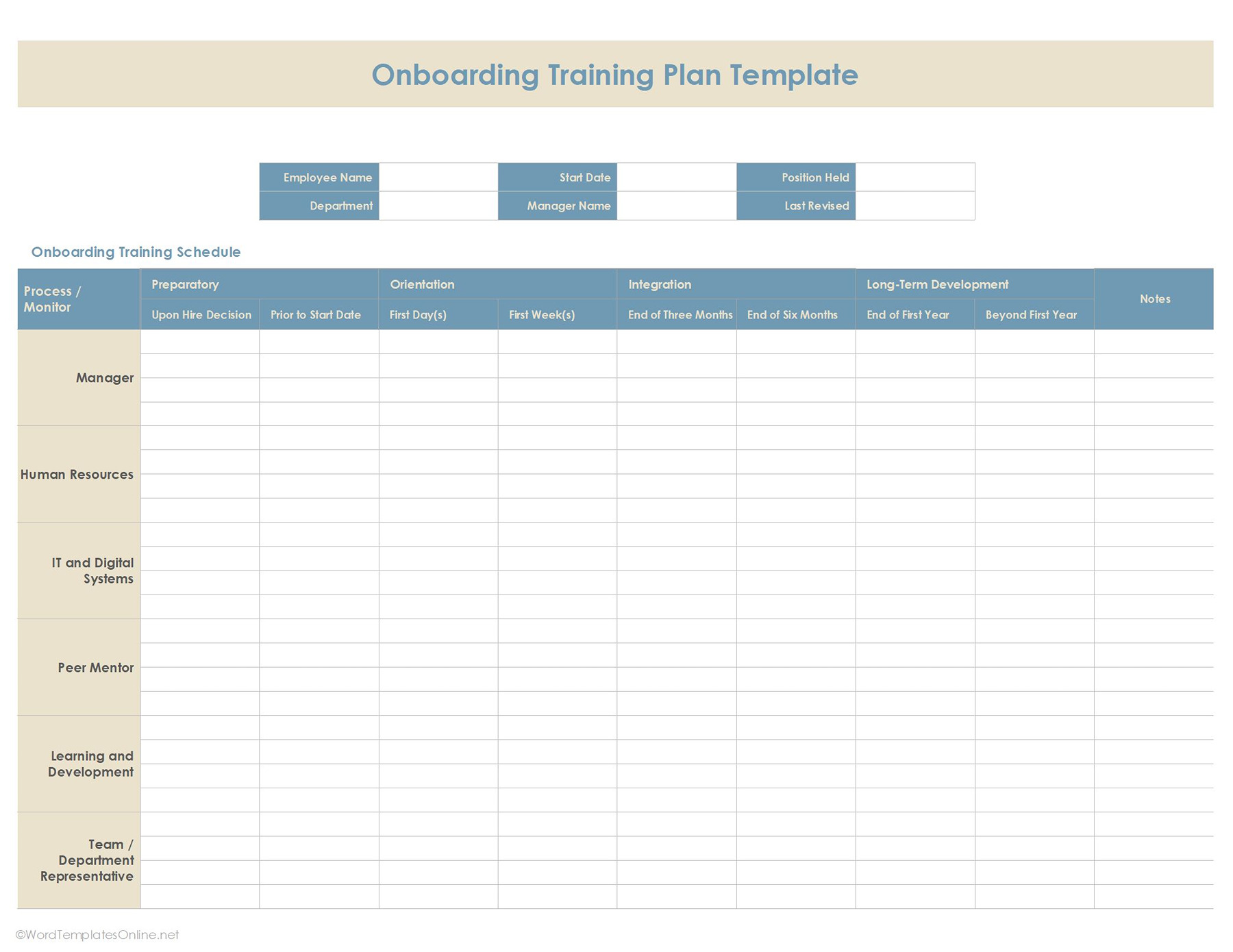
Onboarding Training Plan Template
What makes this template highly valuable is its matrix setup because it shows who is responsible when things need to happen.
On the left side, it mentions all the important people or departments that need to help with onboarding, such as the Manager, IT, Digital Systems, a Work Buddy, and a Team Lead. In columns, you will see the timeline, such as:
- What needs to be done before day one, e.g., accepting the offer. (Preparatory)
- The first day and the first few weeks of kicking off the journey. (Orientation)
- A quick check-in around the 3-month and 6-month marks to make sure they are adjusting well. (Integration)
- Keeping an eye on their growth at the end of their first year and beyond. (Long-term development)
If you’re specifically focusing on first responders or emergency crews:
A training plan for the emergency crew must be built sensibly. So, this template is designed as a highly visual, calendar-style schedule specifically catering to first responders (e.g., firefighters). It acts as a step-by-step course catalog that makes it super easy to see what classes are coming up next.
Fire Department Training Plan Template
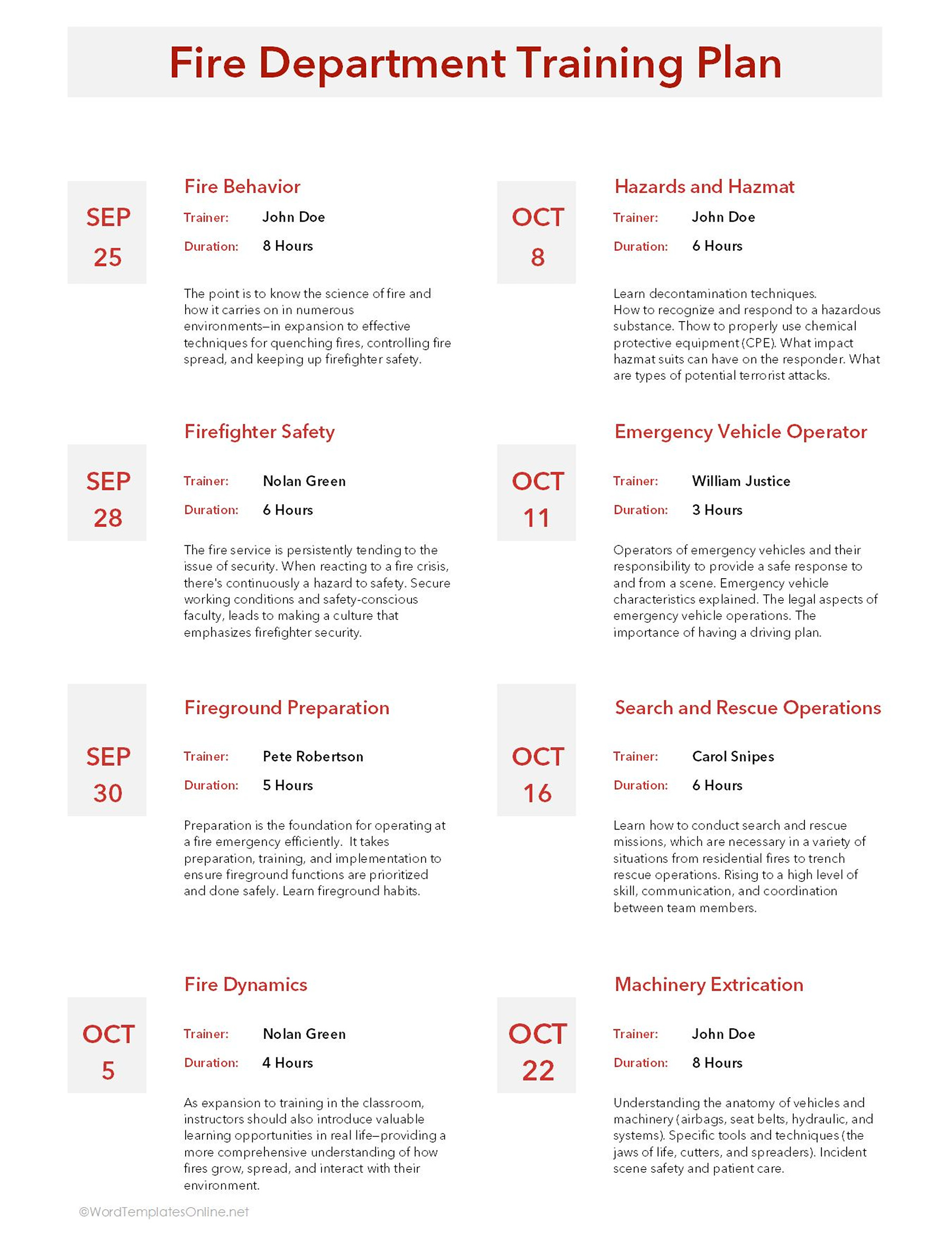
Fire Department Training Plan Template
Here’s how each training block is set up:
On the left of each topic, there is a big, bold date block. This makes it incredibly easy to scan down the page and see the chronological timeline of the training. Additionally, each course block quickly tells you who the trainer is and how long it takes. Underneath this, there’s a short paragraph explaining what the crew will be learning. That’s all!
If you want to monitor employee growth and improve performance management:
The employee training plan template is your ultimate game-changer. It is a very detailed and realistic layout that is built to track an employee’s learning and development over time in a systematic way. Basically, this is not about listing training sessions but giving a complete timeline that shows what an employee needs to learn during different stages of their role.
Employee Training Plan Template
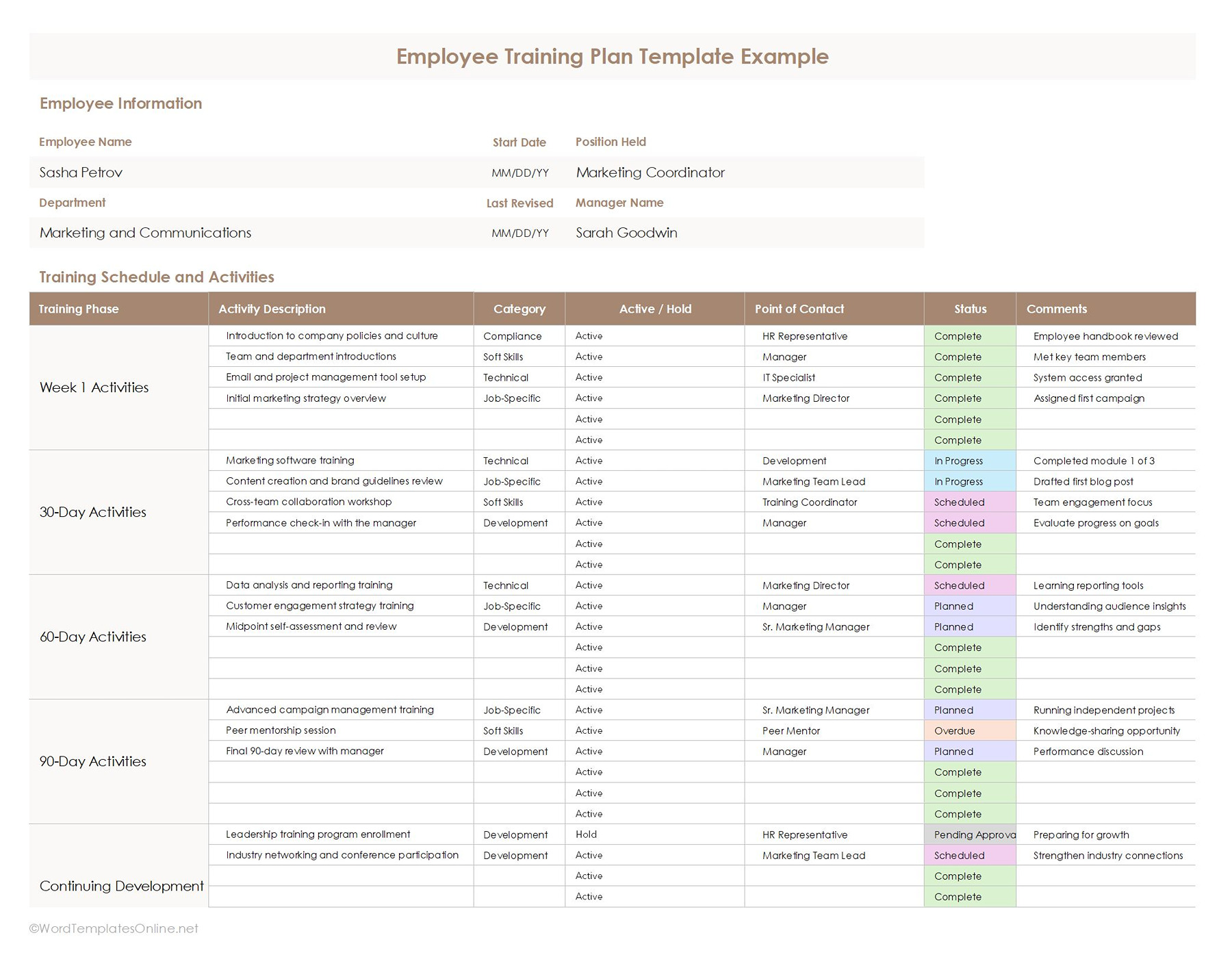
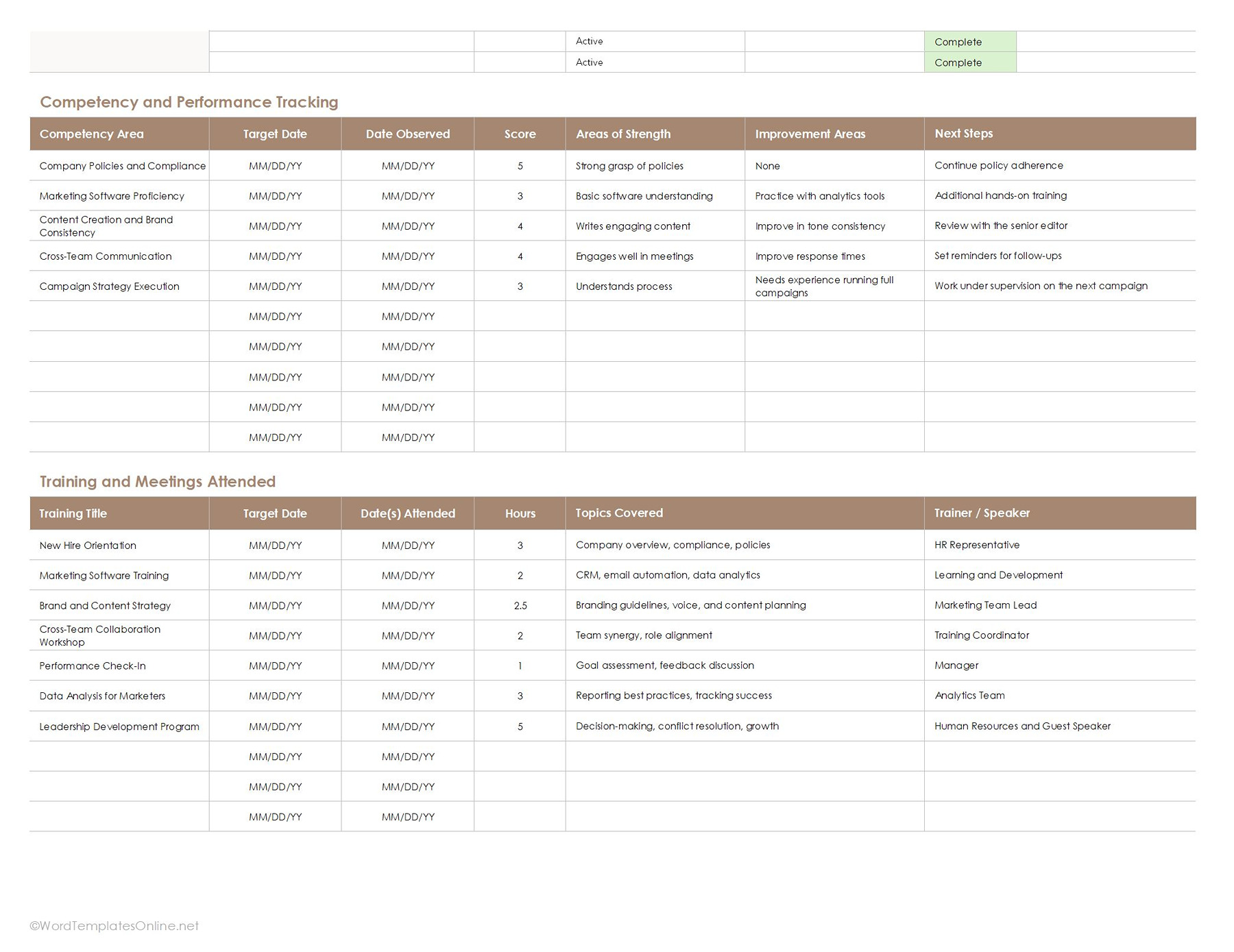
Employee Training Plan Template
First things first, it all starts with putting the basic information, such as department, position, manager name, and review dates, making it simple for everyone to check on the employee’s progress. The main section or sheet is filled with training activities that are divided into phases like Week 1, 30-Day, 60-Day, and 90-Day milestones. This makes the whole process feel gradual and realistic.
Furthermore, as you can see, each activity covers categories such as compliance, testing, or other tasks, along with dedicated contacts, status updates, and comments. All of this makes sure that the team can see what training has been completed, what’s in progress, and where employees need extra effort on a single sheet.
Plus, what we really like about this template is that it goes beyond just scheduling training. It also mentions employee strengths, competencies, and performance review, areas of improvement, and future goals. There’s even a section for documenting meetings, workshops, and training sessions attended over time.
You can also discover employee training plan templates in weekly, monthly, daily, annual, and cross formats and choose the one that goes with your setup.
If you want to improve employees’ compliance efforts:
This compliance training plan template is particularly designed for this purpose. It allows companies to keep employee compliance training highly manageable. Including sections for training schedules, certification tracking, assessment results, deadlines, and training sessions attended, it makes it really easy to keep an eye on employee progress and regulatory requirements in one place.
Compliance Training Plan Template
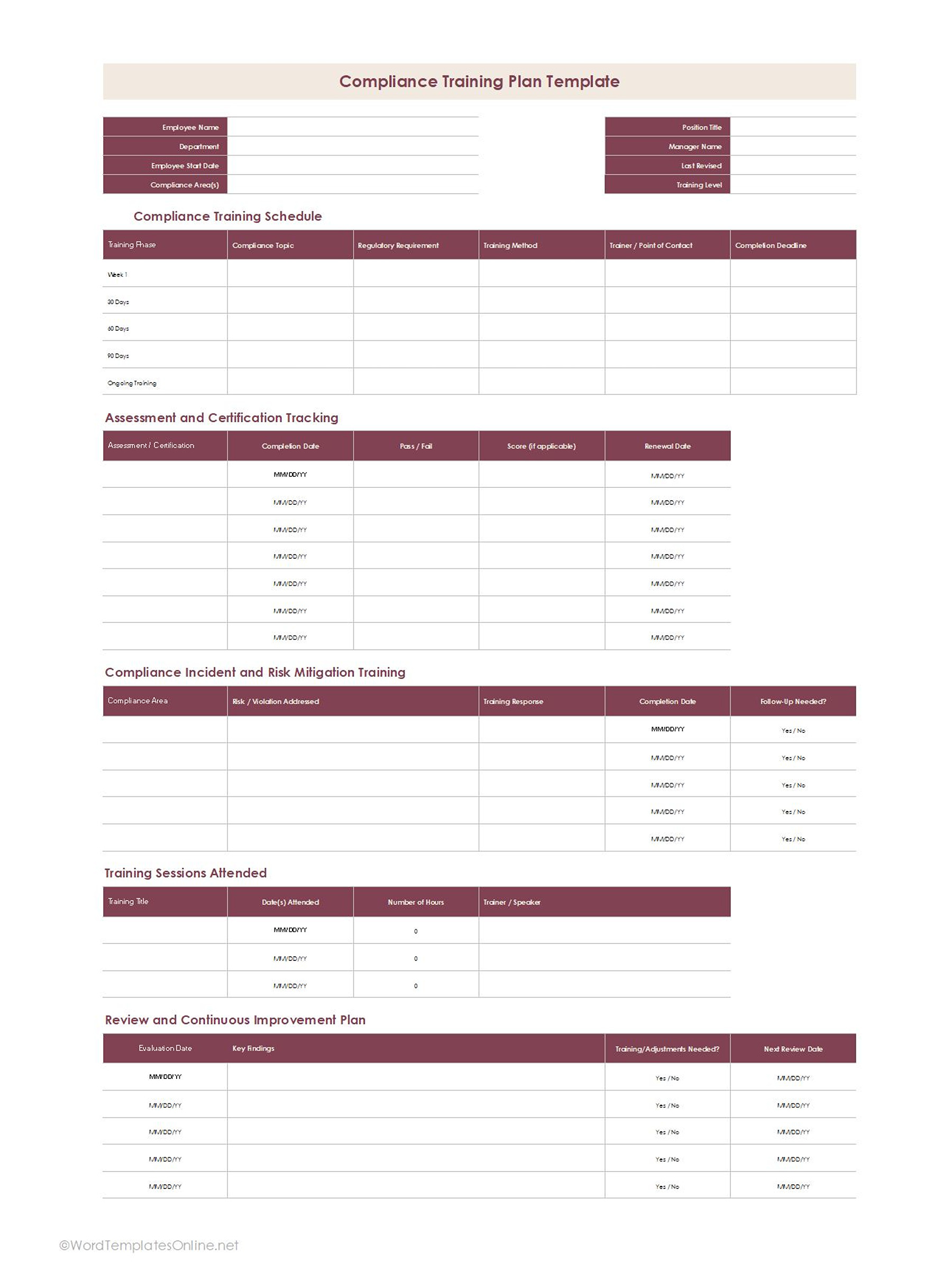
Compliance Training Plan Template
For smoother communication and engagement between employees during a period of change:
A change management training plan is what works best. It is a simple and practical template that helps train employees during times of change in the workplace. Well, it can be new system changes, processes, restructuring teams, or adapting new business goals.
Change Management Training Plan
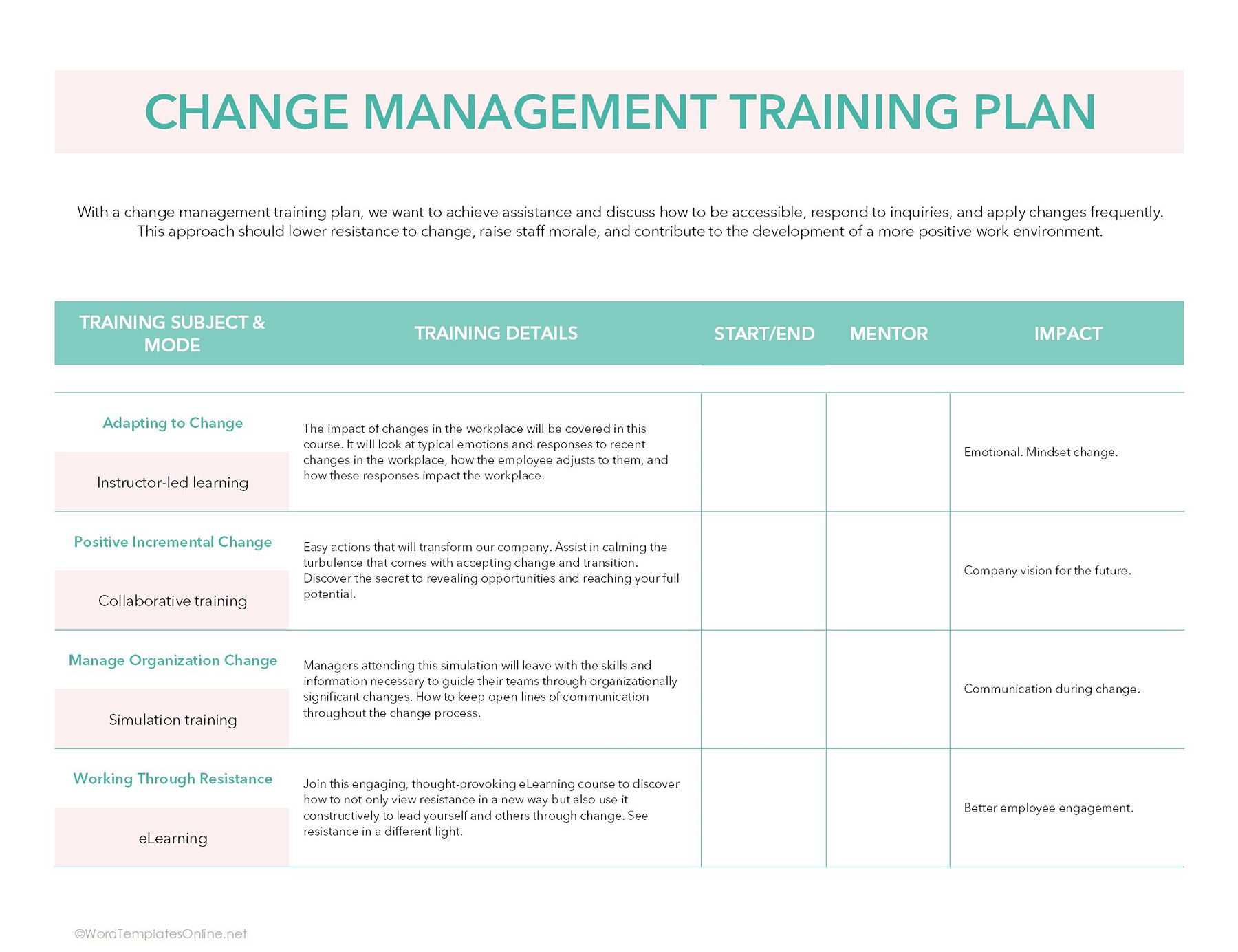
Change Management Training Plan
The template is divided into different training modules, such as adapting to change, managing organizational change, and more. Each module further explains the type of training being used, the learning details, the instructor involved, and the impact of this training on employees and the company.
Other Employee Training Plan Templates
Employee Monthly Training Plan Template
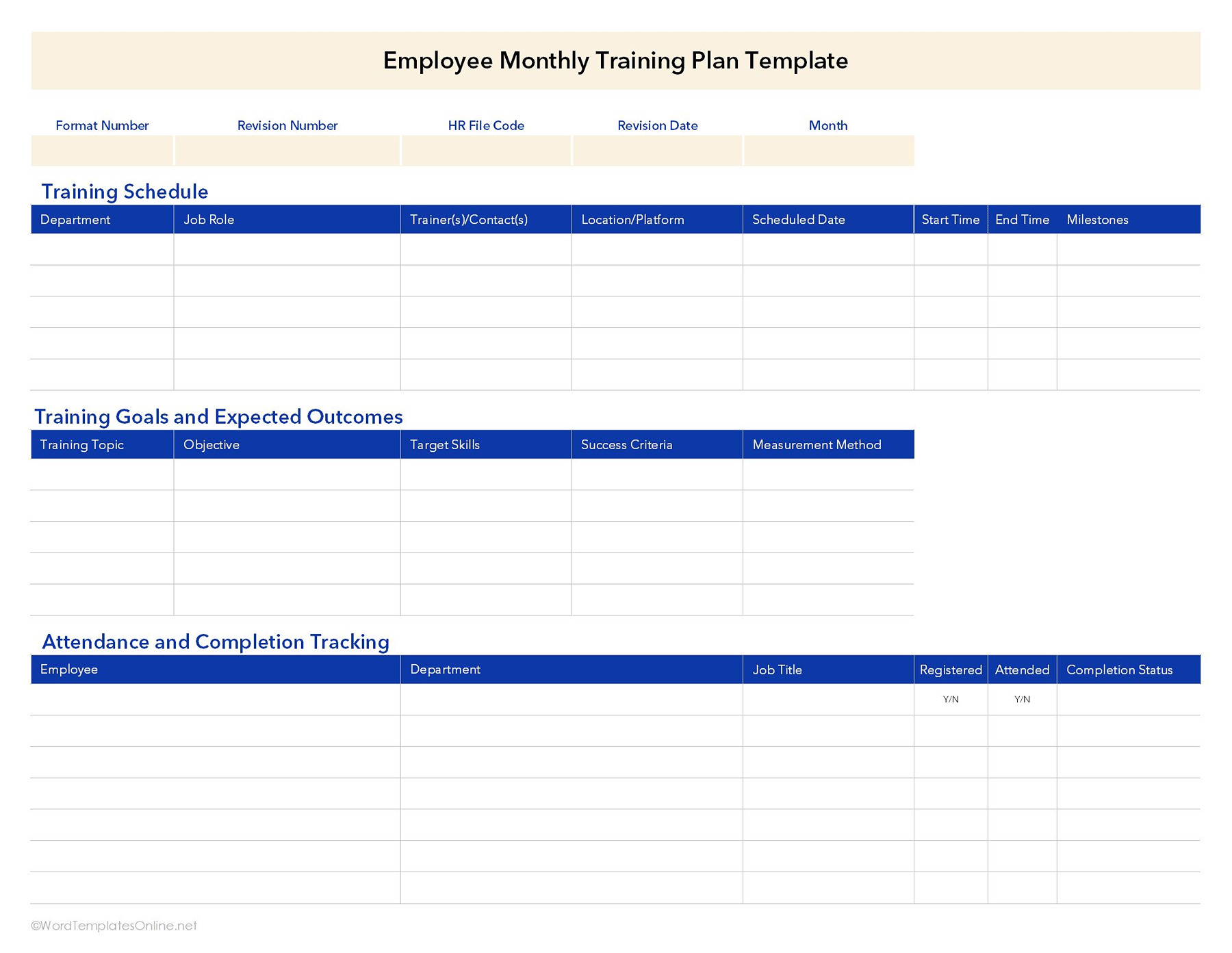
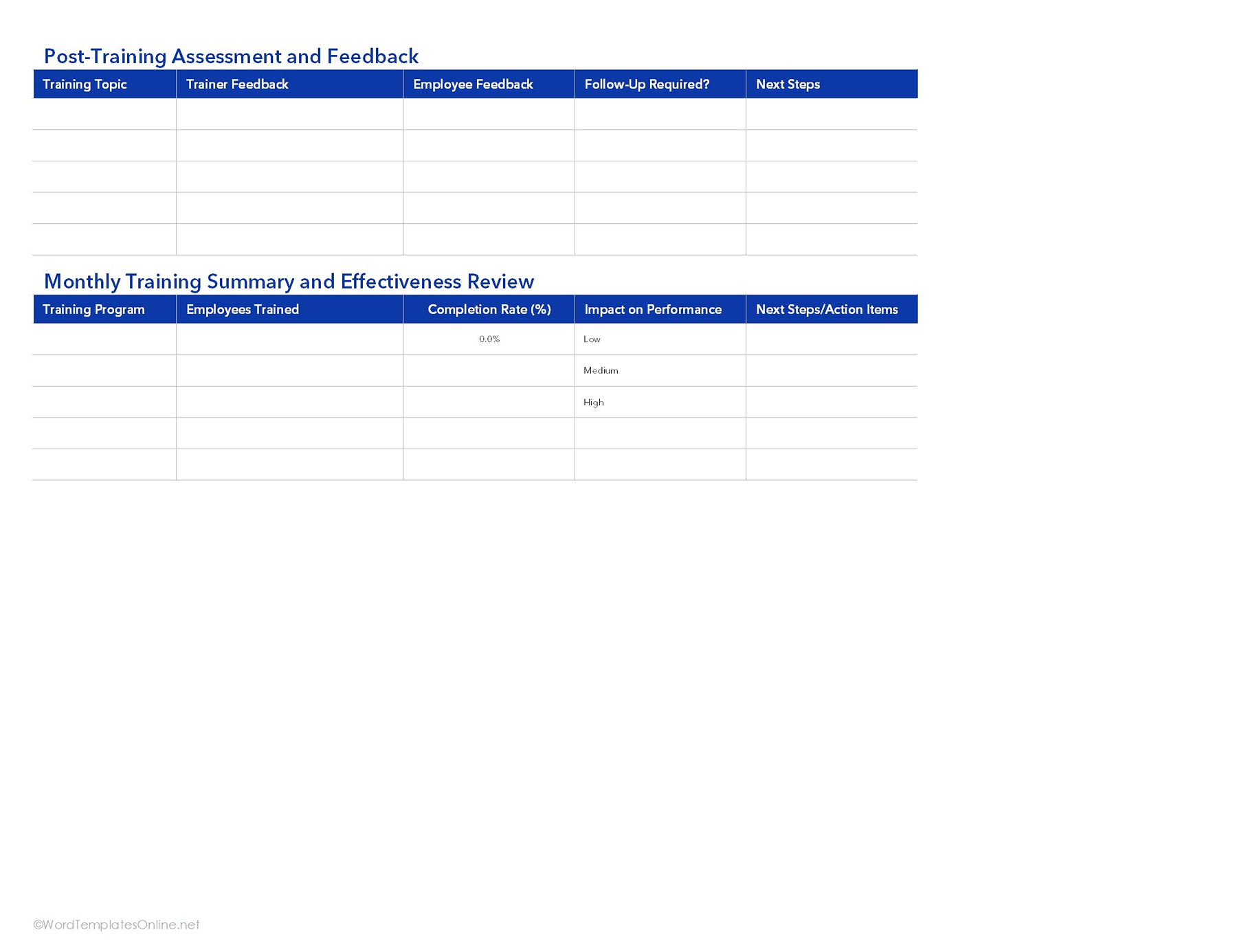
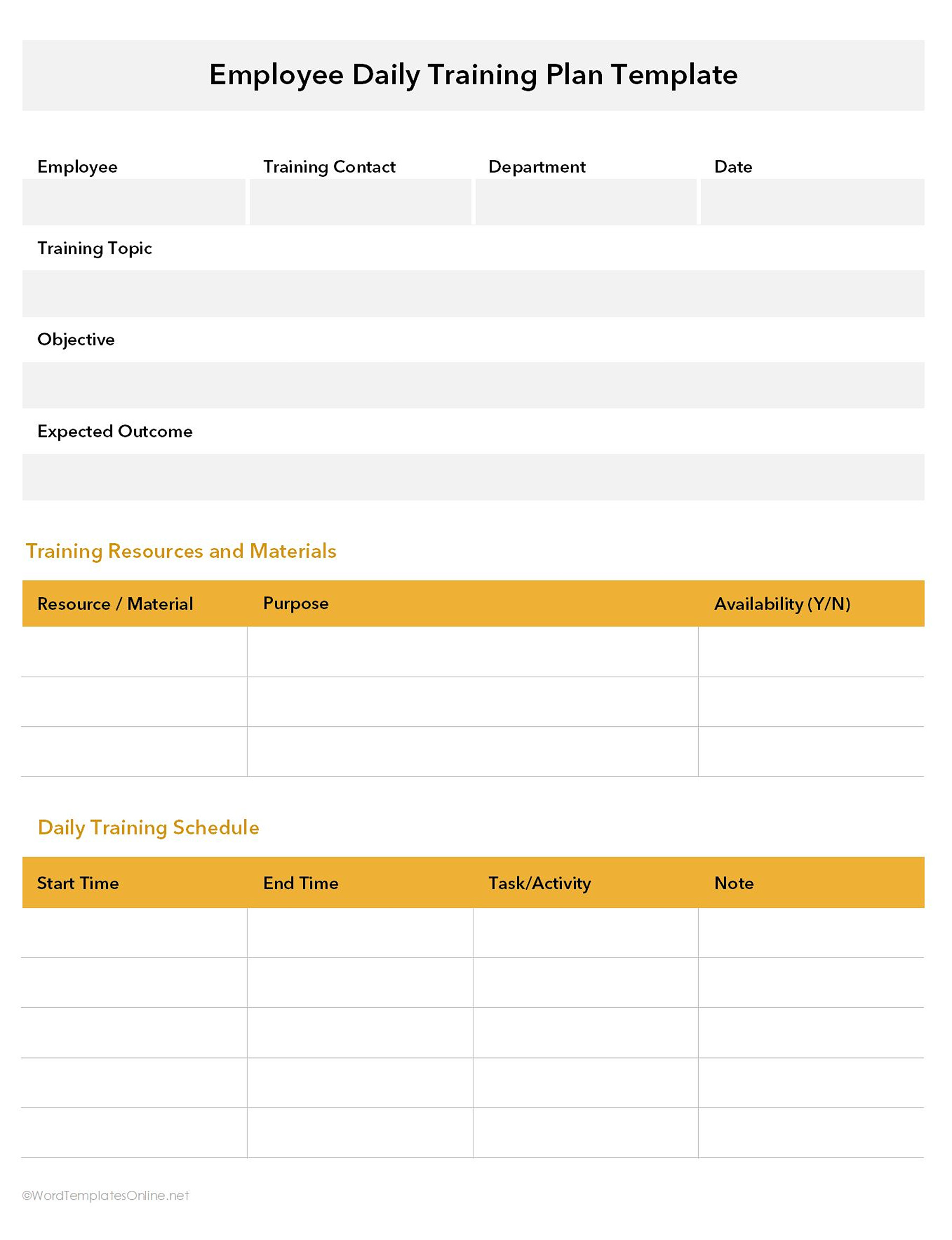
Employee Daily Training Plan Template
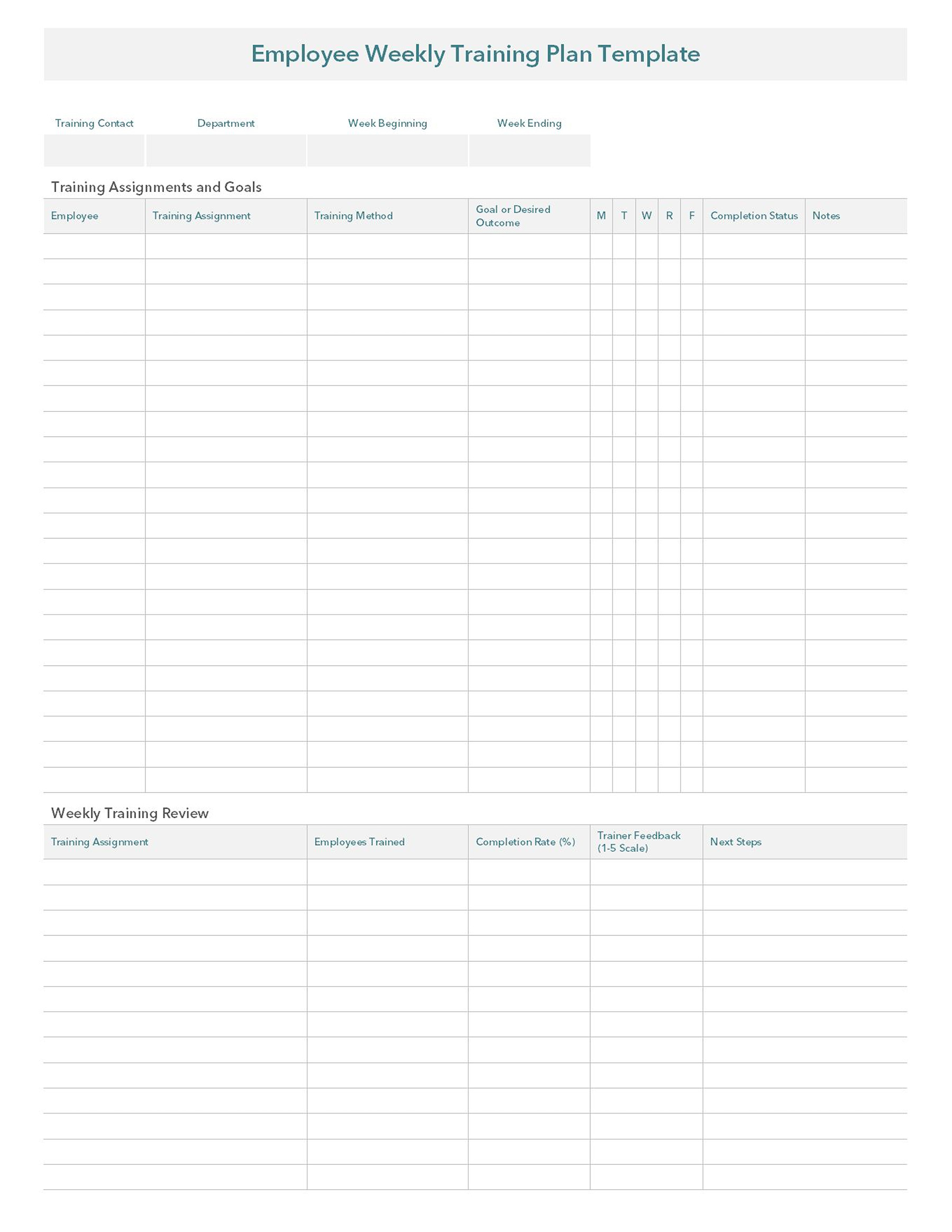
Employee Weekly Training Plan Template
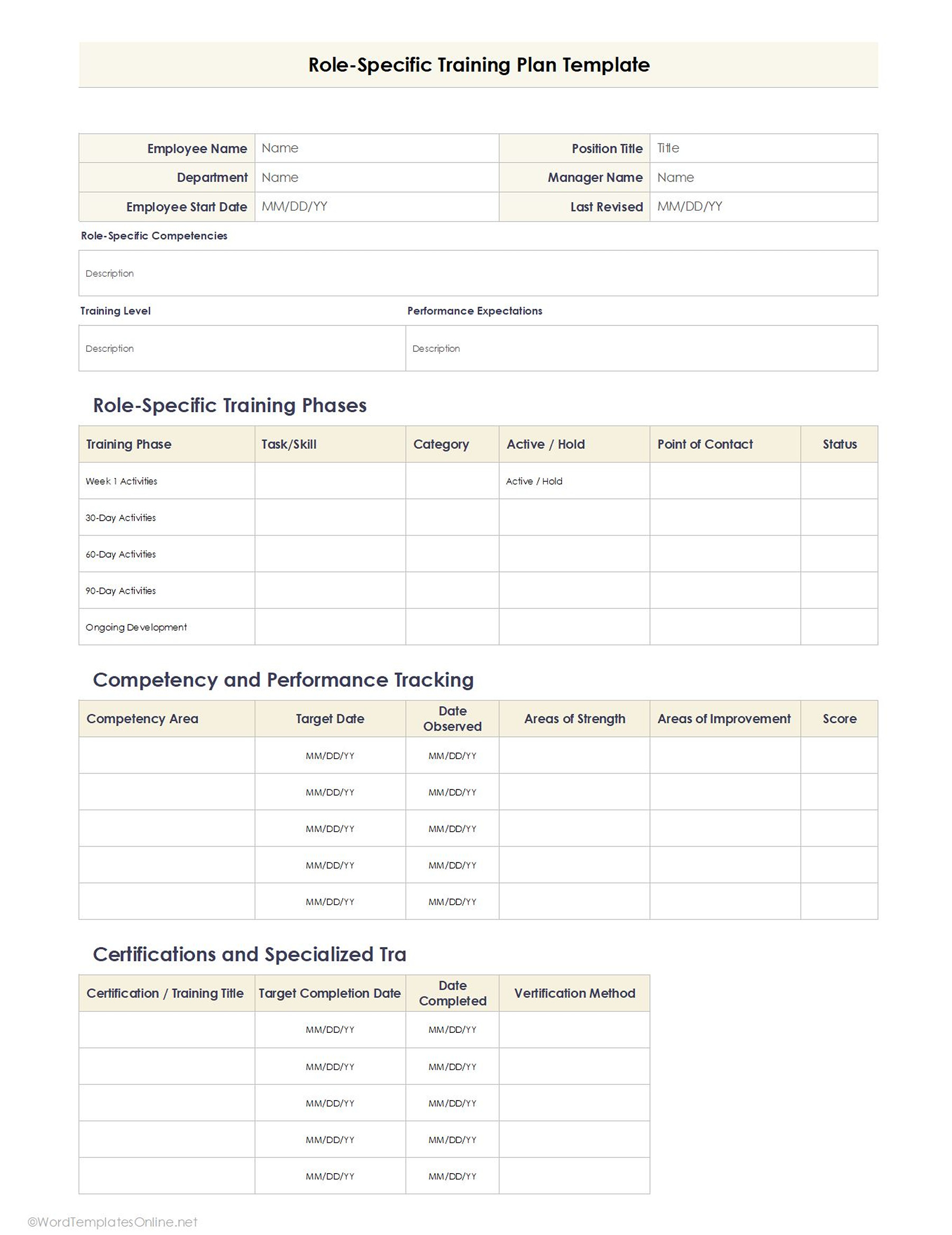
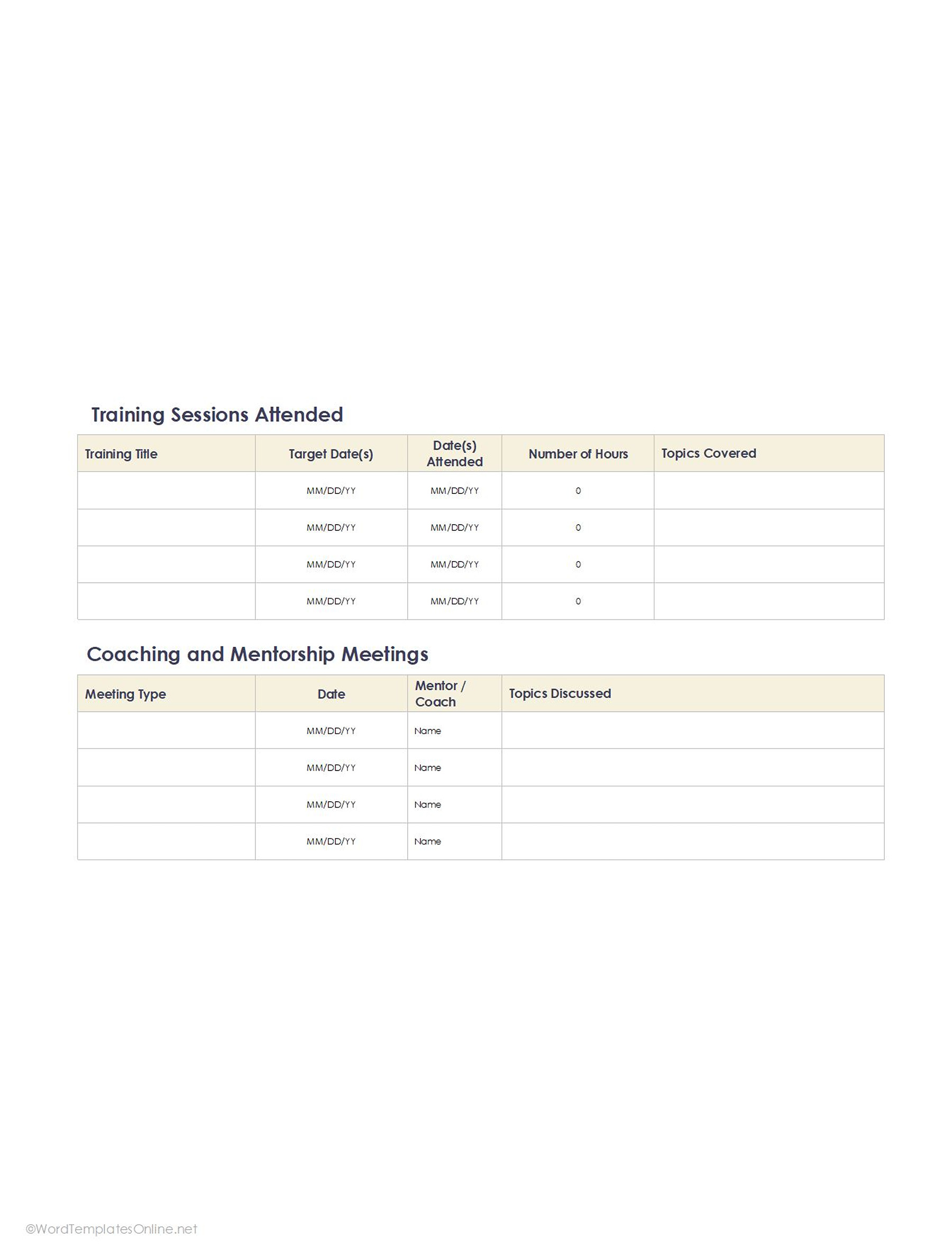
Role Specific Training Plan Template
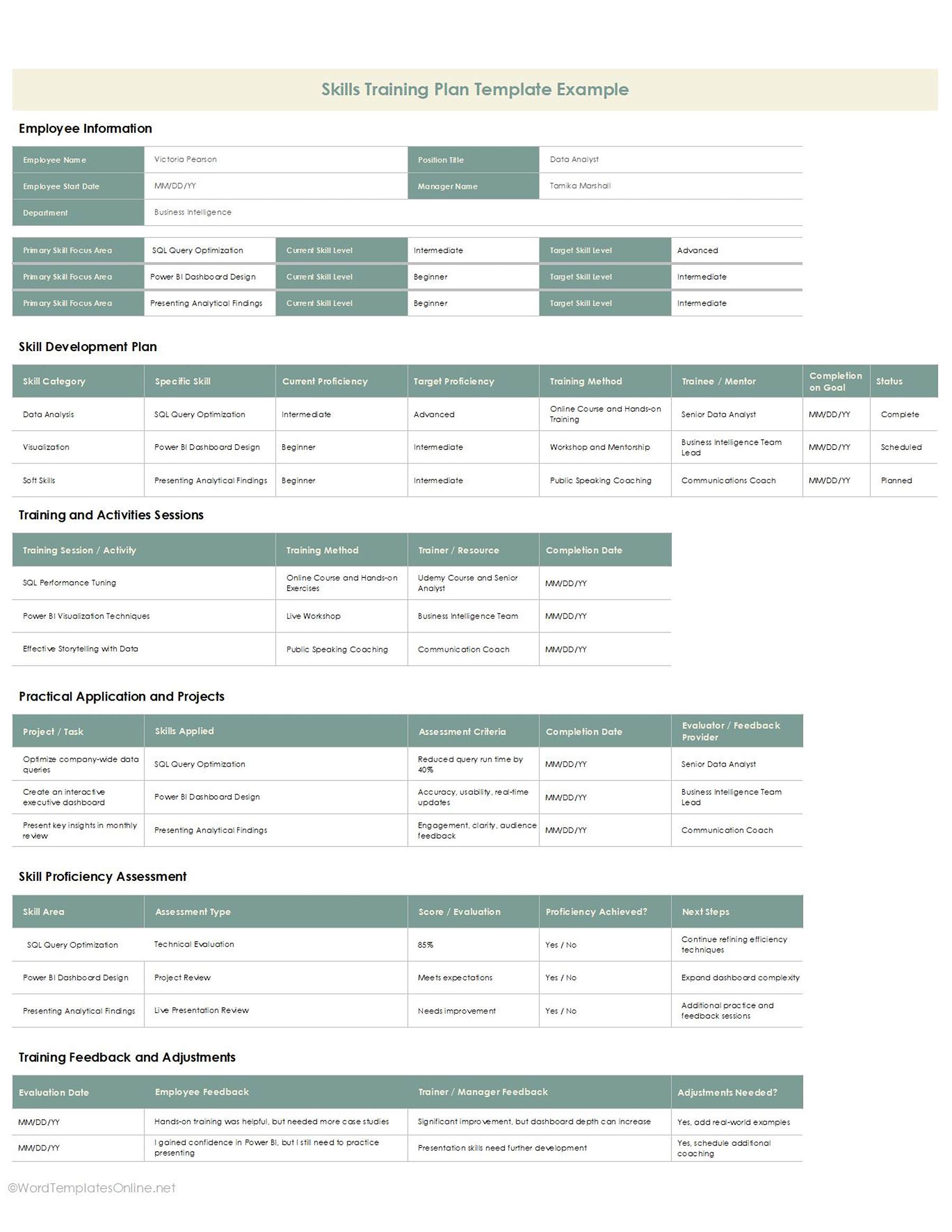
Skills Training Plan Template
Mapping Out a Successful Training Strategy
A good training strategy is not something that happens by chance. If you don’t have a plan, training can feel rushed, disoriented, and difficult for employees to keep track of. That’s why many companies use templates so that the whole process feels more structured and straight from the beginning. Here’s how you can do that:
- Find out what the skill gap is: If you think that time will reveal the gap itself, you get it wrong. You need to figure out where employees need improvement. Training templates make this simpler by helping managers list current skill levels and find areas where extra support is required.
- Prioritizing skills that need training: Not all training tasks need to happen at once. Companies usually focus first on the skills that directly affect productivity, compliance, or daily operations. If you have the right training template, you can do this really easily.
- Setting learning targets that sound achievable: Setting unrealistic goals will lead to chaos only. Employees learn better when goals are realistic and manageable. So, try to train them with smaller targets, milestones, and progress checkpoints.
- Go for the right training method: Companies usually brush off this, but don’t. Different employees learn in different ways; that’s why they always look up and then choose training methods. Some prefer workshops, some need hands-on training, while some go online. Discuss with your employees and then devise.
- Don’t forget to measure training success: Training is only useful if companies can see real improvement afterward. For this reason, every template has this section that includes reviews, feedback, and assessments so that you can easily measure employee performance and overall training success.
Smart Ways to Make Training Plan Templates More Effective
If you want your template to be really effective, just do a few little things, and you’re on the roll:
- Templates are not one-size-fits-all: Not every employee needs the same training plan. A software training template, for instance, will look very different from an onboarding and a compliance one. So, that’s why you choose a relevant template.
- Combine practical tasks with learning sessions: Theory is great, but a practical session is what makes the learning experience more reliable. The best training templates have everything, from theory to hands-on activities, workshops, and real-world exercises.
- Track progress inside the template: The one thing that makes templates effective is “Are they monitoring progress side by side? A good training template does so by including sections such as completed tasks, reviews, and milestones. Tracking progress inside the template makes sure managers are updated with the complete process and where it stands.
- Keep templates updated regularly: Remember, training templates can quickly become outdated if they consist of old systems, policies, or workflows. It is important to update templates regularly so that they make sure employees are learning skills that are current, in demand, and according to company expectations.
- Using a plan for continuous learning: Training shouldn’t stop after onboarding. A plan can be used for long-term employee development, skill enhancement, and performance growth. A reliable template helps you make long-term plans and learning strategies.
So, what we get to know is…
Training shouldn’t have to feel disorganized or confusing. If you have a clear plan behind it, training employees becomes a lot easier. This is only possible if you have useful templates that are designed to keep everything sorted and manageable, from onboarding and skill development to change management and compliance training. Luckily, our templates come in different types and formats that take away the hassle of building and let you focus on training.
Frequently Asked Questions
Can I edit the template for different departments?
Yes, for sure. The best thing about our templates is that they are fully customizable. You can easily adjust them depending on your role and needs.
Are training plan templates useful for small businesses?
Perfectly! Every business, from small to enterprise, can use them to arrange onboarding, employee development, and skill training without spending too much time creating plans from scratch.
About This Article